Think Beyond the Happy Path
Real LLM serving systems aren't just about streaming tokens — they're about low-latency first-token delivery, high availability across model replicas, and rate limiting that protects both users and GPU resources.
Before diving into the material, take a moment to ask yourself:
- Do you know how to prevent slow token starts or long tails from degrading user experience — what's the role of a Model Proxy Layer with smart warmups?
- Do you know how to prevent a partial GPU outage from breaking all completions — how do you design for high availability across model replicas?
- Do you know how to implement rate limiting that prevents one user from choking the system while still being fair to legitimate heavy users?
- Do you know how to prevent sudden traffic spikes from overwhelming your streaming infrastructure — what backpressure mechanisms would you use?
You don't need to answer all of these right away. A Senior/Staff+ Engineer doesn't stop at basic functionality — they anticipate edge cases, design for resilience, and push for production-grade reliability.
But great systems start with great questions. What would you ask next?
Problem Statement
Design the application backend for a ChatGPT Playground — a lightweight, interactive web tool that lets users experiment with ChatGPT. The system should:
- Submit prompts and view completions streamed in real-time.
- Adjust generation parameters (temperature, max tokens, etc.).
- Save prompts as reusable presets.
- Search, load, and run existing presets.
What is ChatGPT? What is ChatGPT Playground?
ChatGPT is an AI system that can understand text you type and generate human-like responses. You give it a prompt — a question, a task, or a piece of text — and it produces a coherent continuation or answer. It's powered by large language models trained by OpenAI, but for this system design, you can think of it simply as an API that takes text input and returns text output.
The Playground is a lightweight, interactive web tool that lets users experiment with ChatGPT.
It provides a simple interface where you can:
- type any prompt,
- adjust response settings (like creativity or output length),
- and see ChatGPT's response instantly.
It's essentially a sandbox for testing prompts and model behavior, without needing to write code or build an application. For our system design, the Playground represents the minimal product that lets users play with ChatGPT through a clean UI backed by a simple backend service.
Scope & Assumptions (What We're Actually Designing)
We are designing the application backend for "The Playground" plus just enough frontend behavior to make the data flow clear.
In Scope
- A backend service that:
- Accepts prompts + user-selected parameters from the UI.
- Validates and normalizes those parameters.
- Calls a pre-trained, externally hosted GPT API (think "given & reliable black box").
- Streams or returns completions back to the frontend.
- Persistence + APIs for:
- Saving presets (prompt + parameters).
- Listing/loading existing presets.
- Basic observability on our side (logging, metrics, simple rate limiting) as part of the backend design.
- A very light frontend assumption:
- Collect prompt + params
- Display generated tokens as a stream
Non-Goals / Out of Scope
These are explicitly outside the scope of this system design:
- Model Training / Tuning
- No pretraining, fine-tuning, RLHF, or model-selection algorithms.
- We treat the GPT model as a pre-trained, already-deployed API managed by another team.
- Core ML / Infra Architecture
- No design of GPU clusters, model sharding, serving infra, or vector stores.
- Latency/throughput considerations are only for our backend, not the internal workings of the model service.
- Rich Frontend / UX Design
- No detailed React component tree, styling system, or complex client-side state management.
- We assume the frontend can display text and controls and can handle simple API responses.
- Auth, Billing, and User Management
- We assume the caller is already authenticated (e.g., behind company SSO or API gateway).
- No payments, quota accounting, or subscription/billing flows.
System Scale
| Scale Metrics | |
|---|---|
| Name | Description |
Daily Active Users (DAU) | 10 million | Core base of engaged, logged-in users generating prompts |
Avg Prompts per User per Day | 10 | Typical user iterates 10 times with retries, tweaks, follow-ups |
Daily Prompt Volume | 100 million prompts/day | 10M × 10 |
Avg Prompt QPS | 1,000 QPS | 100M prompts / 100,000 seconds |
Peak Prompt QPS | 10,000 QPS | 10× burst factor to handle peak usage hours |
Concurrent Generations | 100,000 | 10K QPS × 10s per generation = 100K live responses |
Tokens per Prompt (input + output) | 1,000 tokens | 300 in + 700 out, rounded down |
Daily Token Throughput | 100 billion tokens | 1K tokens × 100M prompts |
Preset Saves per Day | 10 million | Assume 1 in 10 prompts leads to a save action |
Concurrent Logged-In Users / Sessions | 1 million | Editing, exploring, reading, not actively submitting |
Preset DB Growth | 10 GB/day | 1KB per preset × 10M/day = 10GB |
Model Calls per Second (with retries) | 10–20K/sec | 10K baseline + retries/tool calls = max 20K |
Functional Requirements
FR1 – Submit Prompt & View Completion
Users should be able to submit a free-text prompt and view the model response typed out live.
Use case:
A marketing intern types: "Write a tagline for an ice cream shop" and clicks Submit.
The UI shows: "Taste the Joy of Summer at Our Creamery!" like a chat.
FR2 – Adjust Generation Parameters
Users can tweak generation settings like temperature, max tokens, etc., and observe how output changes.
Use case:
A copywriter reruns the same tagline prompt with temperature=0.2 and then 0.9, comparing the creative differences.
FR3 – Save Prompt as a Preset
Users can save a prompt and its parameters as a reusable named preset.
Use case:
After crafting a strong "Brand Tagline Generator," the user taps Save, names it "Taglines – Playful," and stores it.
FR4 – Search, Load & Run Existing Presets
Users can search for and run saved presets using new input text.
Use case:
The user types "summarize" into the preset search bar, selects "Summarize for a 2nd grader" from the filtered list, pastes in a paragraph, and clicks Submit to get a simplified version.
Non-Functional Requirements
NFR1 – Latency: Time-to-First-Token ≤ 300 ms, End-to-End Completion ≤ 2 sec (p95)
Why this matters:
In a system handling 10,000 prompt submissions per second, latency isn't just about speed — it directly affects perceived quality and user engagement. A slow UI feels broken even when the system is technically functional. Instant token streaming gives users a sense of progress and keeps the feedback loop tight — especially critical when users are rapidly iterating prompts.
Deep dive challenge:
How do we prevent slow token starts or long tails from degrading UX?
NFR2 – Availability: 99.9% Success Rate Across Prompt Submission Flow
Why this matters:
At 100M prompts/day, a 0.1% failure rate still means 100,000 broken generations daily. Users expect reliability from AI tools, especially when using saved presets or collaborating across sessions. High availability ensures the Playground remains usable even when parts of the system — like the model — are temporarily degraded, without breaking prompt editing, UI rendering, or preset loading.
Deep dive challenge:
How do we prevent a partial outage from breaking all completions?
NFR3 – Rate Limiting: ≤ 60 Requests per User per Minute, ≤ 2 Concurrent Generations per User
Why this matters:
In a 10M DAU system, even 1% of users misbehaving (intentionally or not) could generate millions of excess requests per minute, potentially spiking model cost and degrading experience for others. Enforcing smart limits and cool-downs protects system stability while keeping honest users unaffected — especially during bursty activity or tab abuse.
Deep dive challenge:
How do we prevent spams from one user choking the system?
NFR4 – Scalability: Support 10k QPS and 100k Concurrent Streaming Sessions
Why this matters:
At scale, usage is never evenly distributed. Peaks, viral usage spikes, and time zone overlaps mean your system must elastically scale while still streaming responses in real time. Supporting 100K concurrent streams without running out of memory, dropping connections, or causing cold-start delays is critical to avoid backlogs and latency cliffs.
Deep dive challenge:
How do we prevent sudden traffic spikes from overwhelming stream infra?
Requirement Summary
| Functional Requirements (FRs) | |
|---|---|
| Name | Description |
1. Submit Prompt & View Completion | Users submit free-text prompts and view model responses typed out live via streaming. |
2. Adjust Generation Parameters | Users can tweak temperature, max tokens, top_p, etc. and observe output changes. |
3. Save Prompt as a Preset | Users can save prompt + parameters as reusable named presets. |
4. Search, Load & Run Presets | Users can search, load, and run saved presets with new input context. |
| Non-Functional Requirements (NFRs) | |
|---|---|
| Name | Description |
1. Latency | Time-to-First-Token ≤ 300ms, End-to-End ≤ 2s (p95) |
2. Availability | 99.9% success rate across prompt submission flow |
3. Rate Limiting | ≤ 60 req/user/min, ≤ 2 concurrent generations per user |
4. Scalability | Support 10K QPS and 100K concurrent streaming sessions |
High Level Design (Delivery Framework: API → Entity → Workflow → Diagram)
FR1 – Submit Prompt & View Completion
Note: This is working solution (not perfect), focused on core functionality. Here are some assumptions reasonably made:
- User is already authenticated (via SSO or token).
- Model is a hosted GPT-3 variant (e.g.,
text-davinci-003) accessed via API, we use GPT-3 in later doc for simplicity. - We do not persist prompt data — we process and stream responses in real time.
API Signature
Request
{
  "event": "generate",
  "request_id": "uuid-1234",  // Optional idempotency key
  "prompt": "Write a tagline for an ice cream shop",  // User's input prompt
  "temperature": 0.9,    // Controls randomness (0 = deterministic, 1 = creative)
  "max_tokens": 256,     // Limits response length
  "top_p": 1,      // Top-p sampling: limits to top cumulative probability mass
  "frequency_penalty": 0.5,    // Penalizes repeated phrases
  "model": "text-davinci-003", // GPT-3 variant
  "stream": true     // Enables real-time token streaming via WebSocket
}
Response
{
  "request_id": "uuid-1234",
  "completion": "Taste the Joy of Summer at Our Creamery!"
}
(Optional) Stop Request
{
  "event": "stop",
  "request_id": "uuid-1234"
}
Entity
PromptRequest: This is a short-lived object used to validate and relay a single generation request. This object exists in memory for the duration of the request. It is not saved to a database unless explicitly logged.
| PromptRequest | ||
|---|---|---|
| Field | Type | Description |
request_id | UUID | Optional deduplication key |
user_id | String | Who submitted the prompt |
prompt | Text | Raw prompt text from user |
model | String | Model name (e.g., GPT-3) |
temperature | Float | Creativity level |
max_tokens | Integer | Response limit |
top_p | Float | Sampling restriction |
frequency_penalty | Float | Controls repetition |
timestamp | ISOTime | When the request was made |
Workflow: Prompt Submission via Streaming
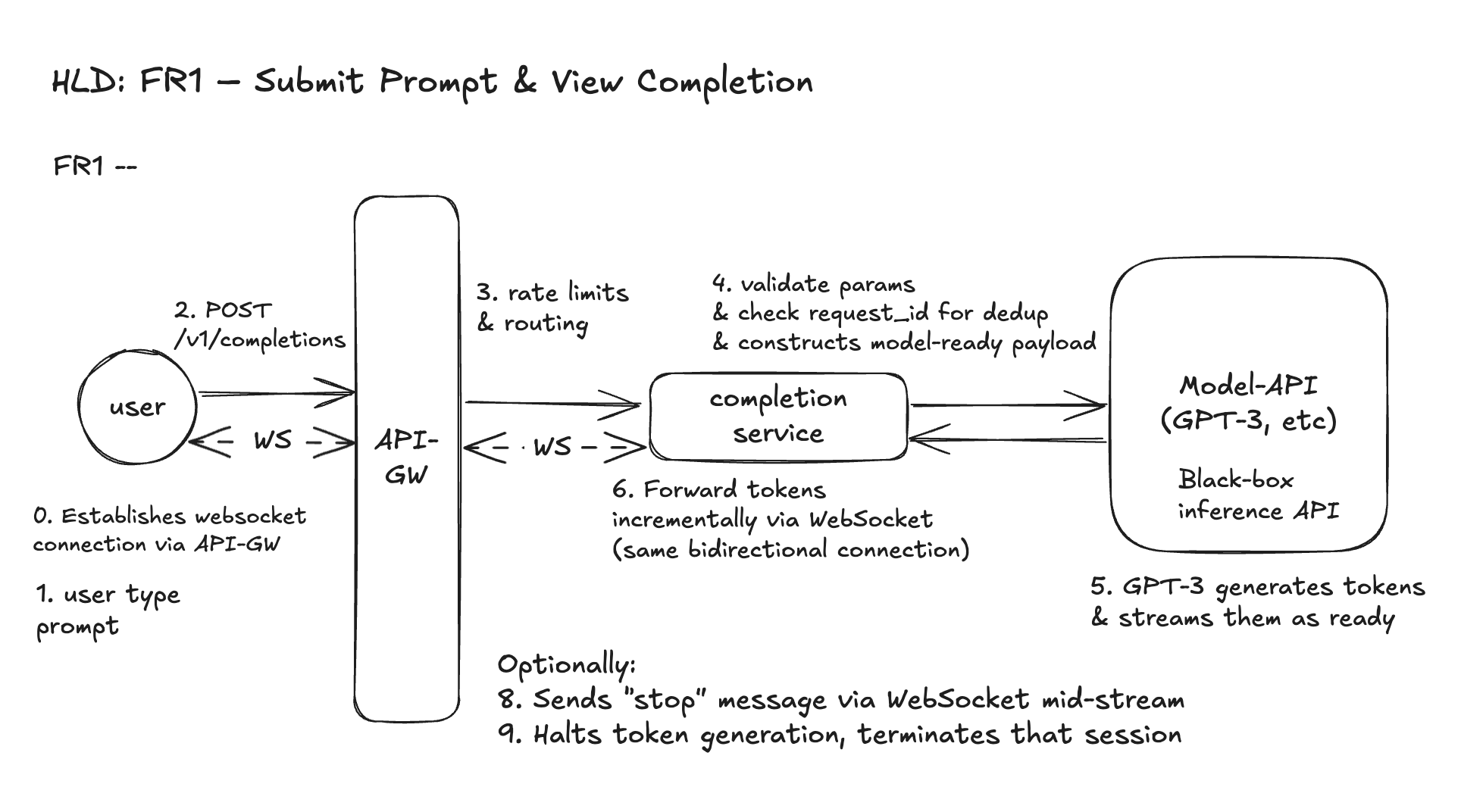
- User types a prompt and chooses parameters in the Playground UI. (Before that we assume WebSocket connection is established).
- Frontend sends a WebSocket message representing the prompt submission, matching the
POST /v1/completionsschema. This schema aligns with our REST spec for composability, but is transmitted over WebSocket. - API Gateway receives the request:
- It does not authenticate (auth is assumed to be handled upstream, e.g., via login/session cookie or API token).
- It applies basic rate limits and usage quotas (we will discuss later).
- Completions Service:
- Validates parameters (e.g., max tokens, numeric ranges)
- Checks
request_idfor idempotency - Constructs a model-ready payload and sends it to GPT-3 (black box)
- GPT-3 begins processing — it takes time to run inference but starts returning tokens one by one as they're ready.
- Tokens are streamed back to the Completions Service, which:
- Uses WebSocket to relay tokens to the user's browser in real time
- Each token is immediately sent as an WebSocket event — the user sees the text "typing out"
- Frontend renders the streamed tokens linearly until the model signals the end of generation.
Why we use WebSocket? What are the other options?
WebSocket is the right fit for streaming GPT completions in the Playground because:
- Bi-directional communication: WebSocket allows the client to cancel a generation midstream — critical for responsiveness when users hit "Stop" or edit their prompt.
- Low latency, persistent connection: A single WebSocket stays open for real-time token delivery, reducing the overhead of repeated HTTP requests.
- Backpressure handling: Enables the server to pause or slow the stream if the client can't keep up — useful for throttling and flow control.
- Typed UX compatibility: WebSocket easily supports "typing" behavior — streaming partial tokens while still letting the client send messages (e.g., cancel, edit, feedback) at any point.
| Other Options and Why They Fall Short | |
|---|---|
| Name | Description |
SSE (Server-Sent Events) | One-way only (server → client). Can't support 'stop generation' or live client input midstream. |
HTTP Polling / Long Polling | High latency, inefficient under load. Doesn't scale for 100K+ concurrent sessions. |
gRPC Streaming | Optimized for backend services, not browsers. Poor support in JS clients, adds transport overhead. |
Design Diagram
Click to expand
FR2 – Adjust Generation Parameters
API Signature
This is the same WebSocket message structure as FR1, but FR2 emphasizes how we validate and tune the model's behavior using exposed parameters.
{
  "event": "generate",
  "request_id": "uuid-5678",
  "prompt": "Give me 3 startup ideas",
  "temperature": 0.3,           // Lower = more focused, deterministic
  "max_tokens": 150,            // Shorter completion
  "top_p": 0.8,                 // Narrower sampling pool
  "frequency_penalty": 0.7,     // Avoid repeated ideas
  "model": "text-davinci-003",  // GPT-3 variant
  "stream": true                // Stream tokens via WebSocket
}
Entity
GenerationParameters - This is a structured sub-object within the prompt request. It is not stored, but is validated and passed to GPT-3. This is Optional.
| GenerationParameters | ||
|---|---|---|
| Field | Type | Description |
temperature | Float | Controls randomness (0–1) |
max_tokens | Int | Limits completion length |
top_p | Float | Top probability sampling filter |
frequency_penalty | Float | Penalizes repetition |
model | String | Which GPT model to use |
stream | Bool | Enables real-time delivery |
Workflow: Parameterized Prompt Submission
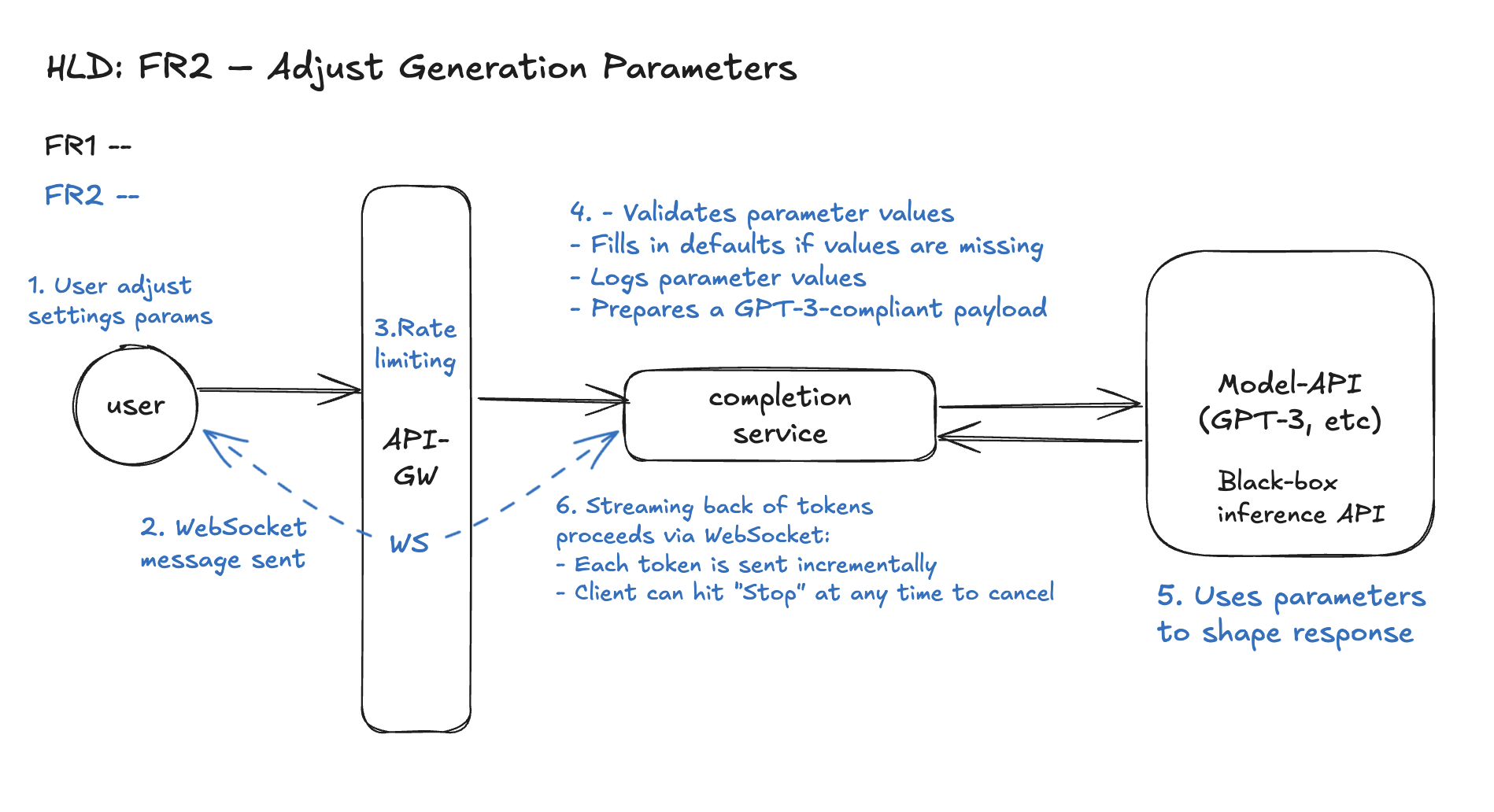
- User adjusts generation settings in the Playground UI via sliders, dropdowns, or advanced options.
- Frontend sends a WebSocket message to backend, embedding the adjusted parameters along with the prompt.
- API Gateway receives the message and applies user-level rate limits and quotas.
- Completions Service:
- Validates parameter values (e.g. temperature ∈ [0,1], max_tokens ≤ 2048)
- Fills in sane defaults if optional parameters are missing
- (Optional) Logs the full
GenerationParametersobject for A/B testing or observability - Assembles a model-ready payload and forwards to GPT-3 API
- Model API uses these parameters to shape generation behavior.
- Streaming back of tokens proceeds via WebSocket, same as FR1:
- Each token is sent incrementally
- Client can hit "Stop" at any time to cancel
- Optional: log or visualize how different settings affect outputs
Design Diagram
Click to expand
Sign in to continue reading
"ChatGPT Playground" requires a free account to access.
Sign in to continue