Functional Requirements
FR1 – Submit Prompt & View Completion
Users should be able to submit a free-text prompt and view the model response typed out live.
Use case:
A marketing intern types: “Write a tagline for an ice cream shop” and clicks Submit.
The UI shows: “Taste the Joy of Summer at Our Creamery!” like a chat.
FR2 – Adjust Generation Parameters
Users can tweak generation settings like temperature, max tokens, etc., and observe how output changes.
Use case:
A copywriter reruns the same tagline prompt with temperature=0.2 and then 0.9, comparing the creative differences.
FR3 – Save Prompt as a Preset
Users can save a prompt and its parameters as a reusable named preset.
Use case:
After crafting a strong “Brand Tagline Generator,” the user taps Save, names it “Taglines – Playful,” and stores it.
FR4 – Search, Load & Run Existing Presets
Users can search for and run saved presets using new input text.
Use case:
The user types “summarize” into the preset search bar, selects “Summarize for a 2nd grader” from the filtered list, pastes in a paragraph, and clicks Submit to get a simplified version.
Non-Functional Requirements
NFR1 – Latency: Time-to-First-Token ≤ 300 ms, End-to-End Completion ≤ 2 sec (p95)
Why this matters:
In a system handling 10,000 prompt submissions per second, latency isn’t just about speed — it directly affects perceived quality and user engagement. A slow UI feels broken even when the system is technically functional. Instant token streaming gives users a sense of progress and keeps the feedback loop tight — especially critical when users are rapidly iterating prompts.
Deep dive challenge:
How do we prevent slow token starts or long tails from degrading UX?
NFR2 – Availability: 99.9% Success Rate Across Prompt Submission Flow
Why this matters:
At 100M prompts/day, a 0.1% failure rate still means 100,000 broken generations daily. Users expect reliability from AI tools, especially when using saved presets or collaborating across sessions. High availability ensures the Playground remains usable even when parts of the system — like the model — are temporarily degraded, without breaking prompt editing, UI rendering, or preset loading.
Deep dive challenge:
How do we prevent a partial outage from breaking all completions?
NFR3 – Rate Limiting: ≤ 60 Requests per User per Minute, ≤ 2 Concurrent Generations per User
Why this matters:
In a 10M DAU system, even 1% of users misbehaving (intentionally or not) could generate millions of excess requests per minute, potentially spiking model cost and degrading experience for others. Enforcing smart limits and cool-downs protects system stability while keeping honest users unaffected — especially during bursty activity or tab abuse.
Deep dive challenge:
How do we prevent spams from one user choking the system?
NFR4 – Scalability: Support 10k QPS and 100k Concurrent Streaming Sessions
Why this matters:
At scale, usage is never evenly distributed. Peaks, viral usage spikes, and time zone overlaps mean your system must elastically scale while still streaming responses in real time. Supporting 100K concurrent streams without running out of memory, dropping connections, or causing cold-start delays is critical to avoid backlogs and latency cliffs.
Deep dive challenge:
How do we prevent sudden traffic spikes from overwhelming stream infra?
High Level Design (Delivery Framework: API → Entity → Workflow → Diagram)
FR1 – Submit Prompt & View Completion
API Signature
Request
Response
(Optional) Stop Request
Entity
PromptRequest: This is a short-lived object used to validate and relay a single generation request. This object exists in memory for the duration of the request. It is not saved to a database unless explicitly logged.
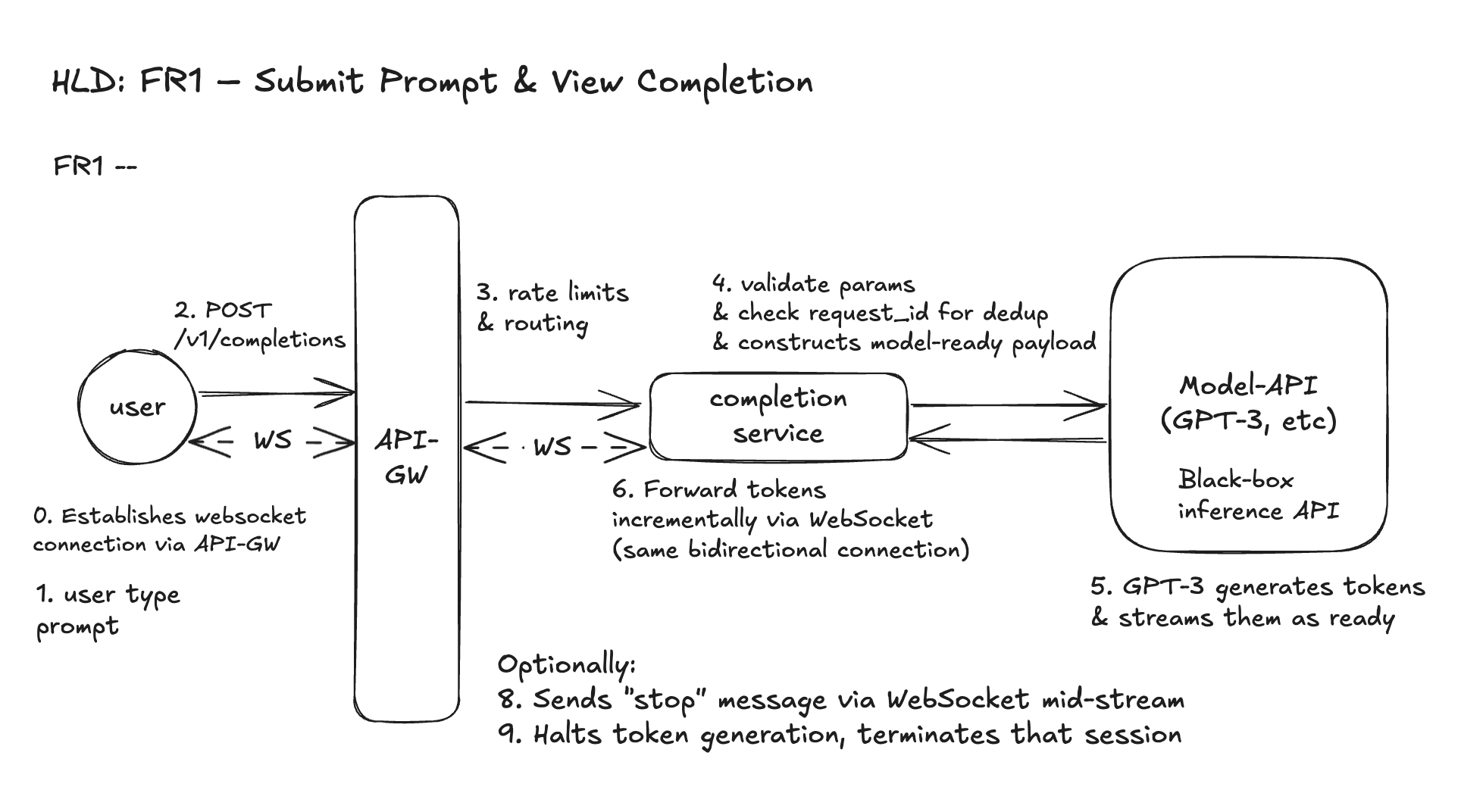
Workflow: Prompt Submission via Streaming
- User types a prompt and chooses parameters in the Playground UI. (Before that we assume WebSocket connection is established).
- Frontend sends a WebSocket message representing the prompt submission, matching the
POST /v1/completionsschema. This schema aligns with our REST spec for composability, but is transmitted over WebSocket. - API Gateway receives the request:
- It does not authenticate (auth is assumed to be handled upstream, e.g., via login/session cookie or API token).
- It applies basic rate limits and usage quotas (we will discuss later).
- Completions Service:
- Validates parameters (e.g., max tokens, numeric ranges)
- Checks
request_idfor idempotency - Constructs a model-ready payload and sends it to GPT-3 (black box)
- GPT-3 begins processing — it takes time to run inference but starts returning tokens one by one as they’re ready.
- Tokens are streamed back to the Completions Service, which:
- Uses WebSocket to relay tokens to the user’s browser in real time
- Each token is immediately sent as an WebSocket event — the user sees the text “typing out”
- Frontend renders the streamed tokens linearly until the model signals the end of generation.
FR2 – Adjust Generation Parameters
API Signature
This is the same WebSocket message structure as FR1, but FR2 emphasizes how we validate and tune the model’s behavior using exposed parameters.
Entity
GenerationParameters - This is a structured sub-object within the prompt request. It is not stored, but is validated and passed to GPT-3. This is Optional.
Workflow: Parameterized Prompt Submission
- User adjusts generation settings in the Playground UI via sliders, dropdowns, or advanced options.
- Frontend sends a WebSocket message to backend, embedding the adjusted parameters along with the prompt.
- API Gateway receives the message and applies user-level rate limits and quotas.
- Completions Service:
- Validates parameter values (e.g. temperature ∈ [0,1], max_tokens ≤ 2048)
- Fills in sane defaults if optional parameters are missing
- (Optional) Logs the full
GenerationParametersobject for A/B testing or observability - Assembles a model-ready payload and forwards to GPT-3 API
- Model API uses these parameters to shape generation behavior.
- Streaming back of tokens proceeds via WebSocket, same as FR1:
- Each token is sent incrementally
- Client can hit “Stop” at any time to cancel
- Optional: log or visualize how different settings affect outputs
Design Diagram
FR3 – Save Prompt as a Preset
API Signature
Request
Response
Entity
Presets - user-owned, persistent records storing prompt + parameters. We only need a simple schema.
Note: Versioning, org-sharing, or metadata tagging can be added later, but not needed in this scoped flow.
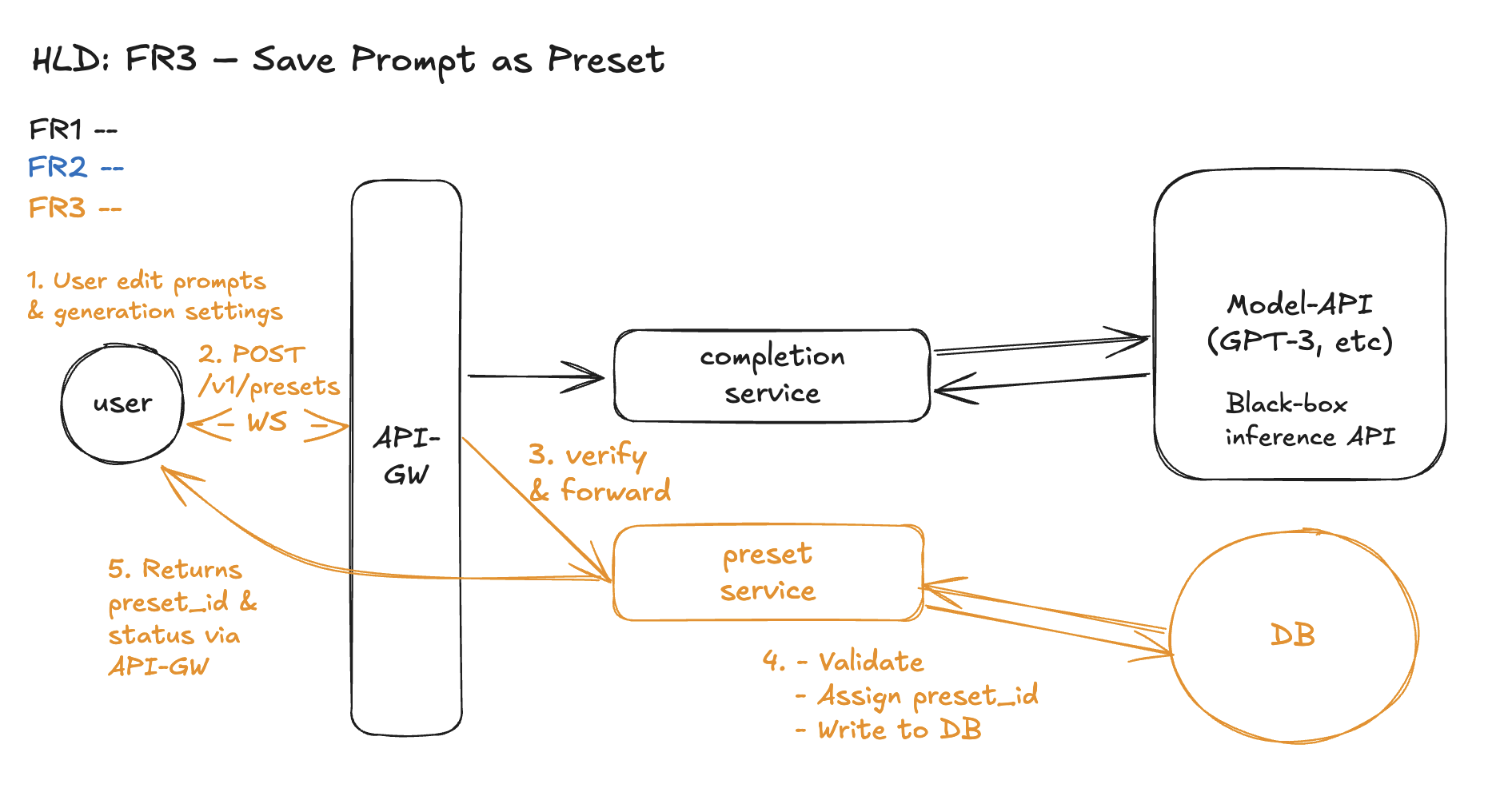
Workflow: Save Preset Flow
- User edits prompt and generation settings in the Playground UI and clicks Save, entering a preset name.
- Frontend sends a
POST /v1/presetsrequest over the existing WebSocket connection. - API Gateway receives the request and:
- Verifies basic auth/session (upstream)
- Passes it to the Preset Service
- Preset Service:
- Validates required fields (
name, valid parameter ranges) - Assigns a globally unique
preset_id - Persists the preset into the Preset DB
- (Optional: logs metric or audit entry)
- Validates required fields (
- Returns confirmation with
preset_idto the frontend for future use.
Design Diagram
FR4 – Search, Load & Run Existing Presets
API Signature
1. Search Presets
2. Load and run a specific preset
Note:
queryis optional; empty returns all presets.preset_idis used to hydrate the prompt + generation parameters.input_contextis user-provided runtime content.
Entity
presets - same as FR3
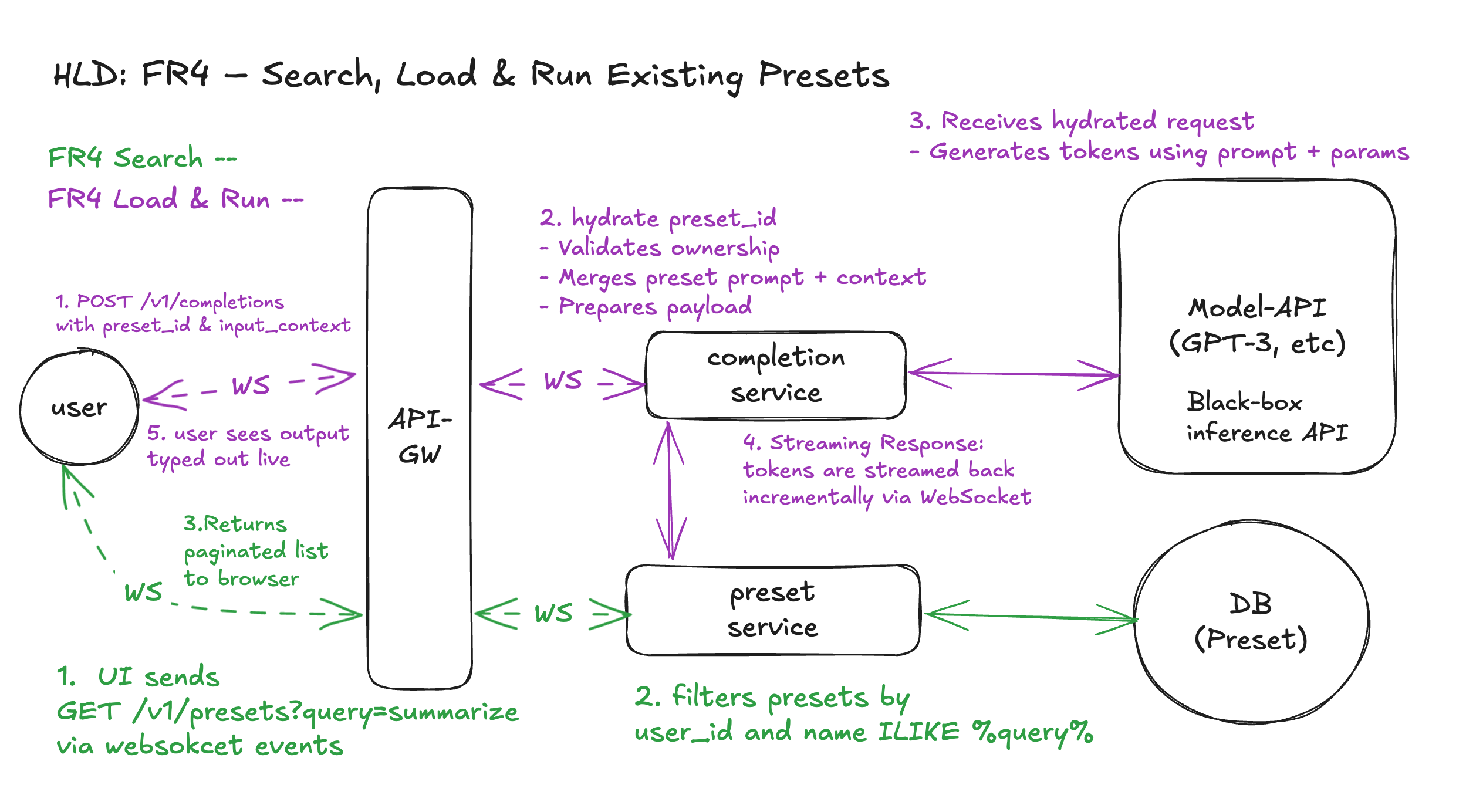
Workflow 1: Search
- User searches for presets
- Types into a search bar (e.g. "summarize")
- UI sends
GET /v1/presets?query=summarizevia WebSocket - API-GW forwards to Preset Service, which:
- Filters presets by
user_id+ fuzzy name match - Returns paginated results
- Filters presets by
Workflow 2: Load → Run
- User selects a preset and provides context
- UI sends
POST /v1/completionsvia WebSocket with:preset_idinput_context
- UI sends
- Completions Service:
- Calls Preset Service to hydrate the preset:
- Fetches prompt + generation parameters by
preset_id - Verifies user ownership
- Fetches prompt + generation parameters by
- Merges
prompt + input_context - Constructs full payload and sends it to the model
- Calls Preset Service to hydrate the preset:
- Model API (e.g. GPT-3):
- Receives hydrated, parameterized prompt
- Generates completion tokens
- Streaming Response:
- Tokens are streamed back incrementally via WebSocket
- User sees output typed out live
Design Diagram
Summary – What’s Working
Limitations – What’s Not Fully Covered Yet
The current high-level design successfully delivers all four core functional requirements with clear APIs, well‑scoped entities, step‑by‑step workflows, and consistent diagrams. Responsibilities are cleanly split between the Completion Service, Preset Service, and API-GW, and the model remains a simple black‑box inference API. All four FRs follow the same routing pattern through API-GW, and WebSocket is used consistently for real-time communication — enabling incremental token streaming, typed‑out UX, and mid‑generation cancellation. Overall, the HLD provides a solid, end‑to‑end foundation for how the Playground accepts prompts, tunes parameters, saves presets, searches them, and streams model output back to users.
However, several deeper system concerns are intentionally left unresolved at this stage. The design does not yet address long‑tail or cold‑start latency from the model API, nor does it specify how to recover from failures in either the model service or the preset database. Rate limiting is currently described only at a high level; we have not covered per-user quotas, abuse protection heuristics, or multi‑tab enforcement. Finally, the HLD does not yet describe how Completion Service and WebSocket infrastructure scale under 10K QPS and 100K+ concurrent streams, including buffer management, backpressure, or autoscaling behavior. These areas will be explored in the upcoming deep dives — one per NFR.
Deep Dives (What breaks the HLD → Options Discussions → Solution)
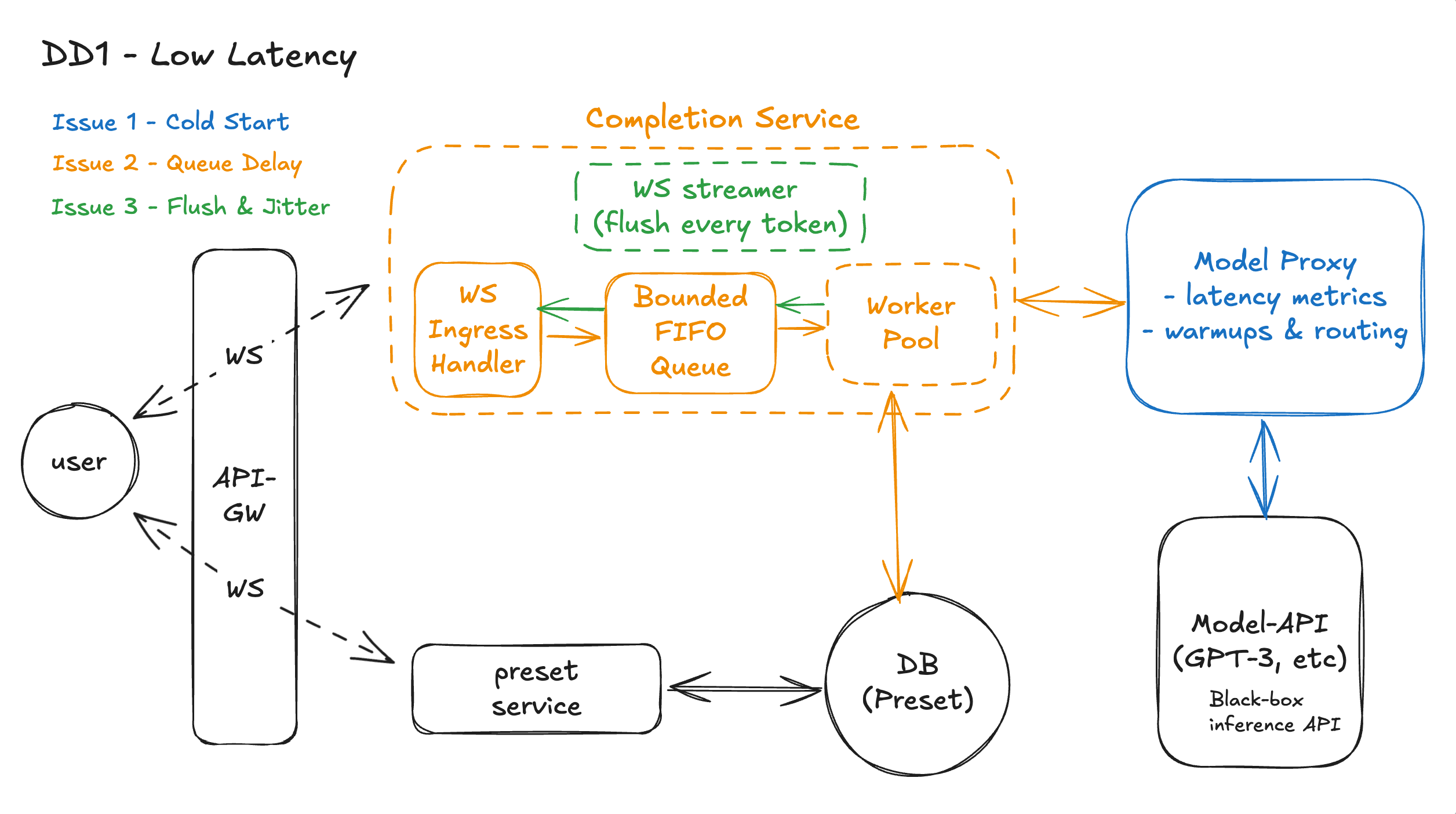
DD1 - Low Latency - Eg, How do we prevent slow token starts or long tails from degrading UX?
Issue 1: Model Cold Start – How do we minimize or eliminate it?
Solution: Option 3 – Use a Model Proxy Layer
We add a Model Proxy Layer between the Completions Service and the GPT-3 API. Its job is to sit in the middle and make smarter, faster calls to the model.
1.Real-time latency monitoring
The proxy tracks how fast each model endpoint returns the first token and how often it fails. If one endpoint is slow or flaky, we simply stop sending traffic there.
2. Smarter warmups
Instead of pinging all the time, the proxy uses recent traffic to decide when to warm a model. It warms when things are about to go cold, and backs off when normal traffic is enough to keep things hot.
3. Better routing
For each request, the proxy chooses the “healthiest” model replica — not the random one. That means fewer cold workers, fewer queues, and faster first tokens.
4. Shield from upstream changes
If the model provider changes how they scale or warm instances, we adapt inside the proxy. The rest of our system still talks to one stable, predictable endpoint.
5. Future-proof hook
Over time, this proxy is where we can add retries, circuit breakers, per-user limits, or shadow traffic for new models — without touching the rest of the Playground.
Issue 2 – Delay in Our Own Completions Service
Even when the model responds quickly, users may still experience visible lag. This often stems from internal queuing delays before a request is even forwarded to the model. These delays typically happen during high load — when the Completions Service receives more prompt submissions than it can concurrently process — resulting in backlogs, slow start times, or even dropped requests if not handled gracefully.
Solution: Option 2 – FIFO Queue + Worker Pool
We choose Option 2: FIFO queue with a worker pool, as it gives us controlled admission, predictable latency behavior, and clean decoupling between request ingestion and model execution.
With this approach, the Completions Service introduces an internal request queue, bounded to a size that reflects system capacity (e.g. 5× the number of workers). Incoming prompt submissions are enqueued, and a pool of worker threads or coroutines asynchronously pulls from the queue and processes the request (i.e., validates, constructs payload, and forwards to the Model Proxy Layer). This design allows:
- Backpressure: Instead of overwhelming the system, bursts are queued and processed at a steady rate.
- Graceful degradation: If the queue fills, we can reject new requests cleanly or offload to another region.
- Latency isolation: Spikes from one user or cohort don’t delay others, as each request flows through the same bounded pipeline.
Issue 3 – Streaming Flush & Jitter in the WebSocket PathEven with WebSockets in place, users can still feel the system is “laggy” if we buffer tokens too long before sending them, or if they arrive in uneven bursts. This shows up as choppy typing: nothing for a while, then a chunk of text, then another gap. These delays often come from how the Completions Service and WebSocket handler decide when to flush outgoing messages — especially under load, when we’re tempted to batch sends for efficiency.
Solution: Option 2 – Flush on Every Token
We choose Option 2: flush each token as soon as it’s ready, because the Playground is fundamentally a latency-sensitive, UX-first product. The primary goal is to make the response feel alive and interactive, not to minimize the number of frames on the wire. With this strategy, the Completions Service’s WebSocket handler writes tokens to the socket immediately as they arrive from the Model Proxy Layer, and the browser renders them as they land. This keeps the perceived time-to-first-token extremely low and avoids jitter caused by batching. The components involved are the Completions Service WebSocket handler (which controls when to send frames), the API Gateway/WebSocket terminator (which must support low-latency forwarding), and the frontend renderer (which appends incoming tokens directly to the UI). Together, they ensure that as soon as the model speaks, the user sees it — with no extra buffering in between.
Workflow
1. User → API-GW over WebSocket
The browser already has a WebSocket open to the API Gateway. When the user hits Submit, the prompt + parameters are sent as a WS message. This avoids a fresh HTTP handshake and gives us a persistent, low-latency channel for both requests and streamed tokens.
2. API-GW → Completions Service (WS)
The API-GW does auth / basic rate limiting, then forwards the WS message to the WS Ingress Handler inside the Completions Service over another WebSocket hop.
3. WS Ingress Handler → Bounded FIFO Queue (Issue 2)The WS Ingress Handler does lightweight validation (shape, required fields, user id) and tries to push the request into the bounded FIFO queue.
- If the queue has space, the request is enqueued immediately (fast ACK to user: “generation started”).
- If the queue is full, we fail fast with a friendly “system busy, please retry” instead of silently adding huge latency.
4. Worker Pool pulls from Queue (Issue 2)A fixed-size Worker Pool continuously pulls requests from the queue. Each worker:
- Hydrates any preset if needed (via preset service / DB path, unchanged).
- Builds the final model payload.
- Calls the Model Proxy instead of talking to GPT-3 directly.
- This decouples “submit rate” from “how fast we can safely run inference” and smooths bursts without unbounded tail latency.
5. Worker → Model Proxy (Issue 1)The worker sends the request to the Model Proxy. The proxy:
- Uses latency metrics to select the healthiest, already-warm model replica.
- Triggers warmups & routing adjustments behind the scenes to avoid cold or overloaded instances.
- As a result, time-to-first-token is minimized even when upstream infrastructure is scaling or fluctuating.
6. Model-API → Model Proxy → Worker (Issue 1)
GPT-3 (Model-API) starts generating tokens. These tokens stream back to the Model Proxy, which forwards them to the worker. Because the proxy has already avoided slow replicas, tokens arrive steadily with fewer cold-start spikes.
7. Worker → WS Streamer (flush every token, Issue 3)
As each token arrives from the proxy, the worker hands it to the WS streamer inside the Completions Service. The WS streamer immediately sends that token over the WebSocket connection — no batching, no fixed-interval buffering.
8. WS Streamer → API-GW → User (Issue 3)
Tokens travel back over the existing WS path through the API-GW to the browser. The browser appends them to the UI as they arrive, giving the user a smooth “typed out” experience with minimal jitter.
9. Presets Path (unchanged latency-wise)
If a preset is involved, the worker briefly calls the preset service → DB (Preset) to hydrate prompt + parameters before step 5. This path is unaffected by DD1 but still sits outside the hot token streaming loop.
Design Diagram
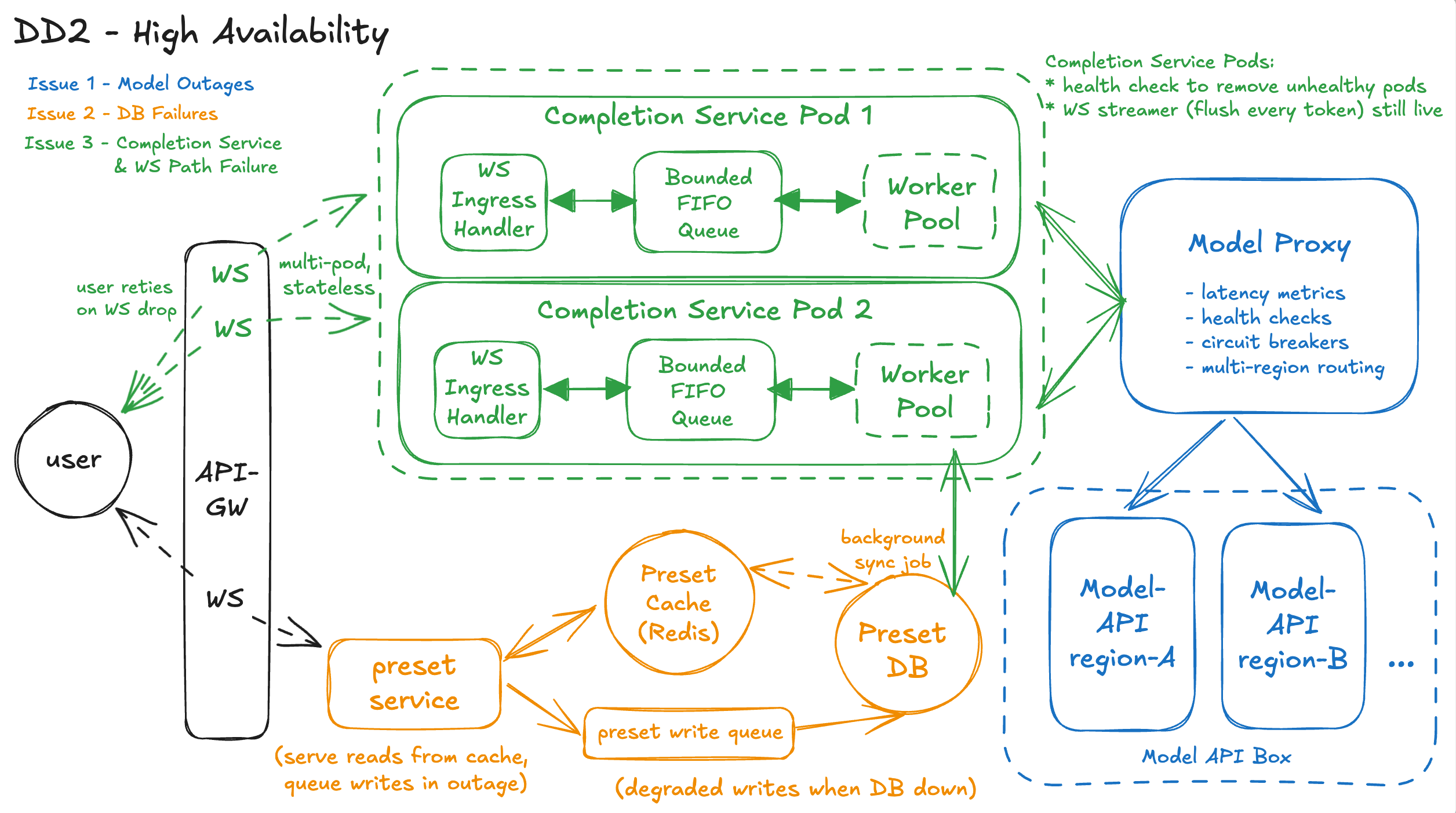
DD2 - High Availability - Eg, How do we prevent a partial outage from breaking all completions?
Issue 1 – Model / Region Outage – How do we avoid a single bad upstream from breaking completions?
Solution: Option 3 – Resilient Model Proxy with Circuit Breakers
We strengthen the Model Proxy Layer so it doesn’t just optimize latency; it also protects us from partial model outages.
1. Per-endpoint health tracking
The proxy maintains rolling metrics for each upstream target (e.g., model=GPT-3, region=us-east-1 vs us-west-2): error rate, timeouts, TTFT. When a target crosses a threshold (e.g., >5% errors or TTFT > X ms), it is marked degraded.
2. Circuit breakers and fail-fast
For degraded endpoints, the proxy “opens the circuit” and stops sending user traffic there. Instead of letting Completions requests hang on a bad region, we fail fast or reroute to a healthier region/model. This keeps broken endpoints from dragging down global success rate.
3. Multi-region / multi-model routing
When a circuit is open, the proxy routes requests to alternate targets: another region running the same model, or a backup model (e.g., smaller but more reliable). This gives us a graceful degradation path: slower or slightly different quality is better than total failure.
4. Simple behavior for Completions Service
From the Completions Service perspective, it still just calls the Model Proxy once. All the complex logic (health checks, circuit breakers, region failover) lives inside the proxy, so the rest of the Playground stays simple.
Issue 2 – Preset Service / DB Failures – How do we avoid presets breaking completions?
Solution: Option 3 – Preset Resilience Layer (Cache + Degraded Writes)
We choose Option 3 because it keeps presets from being a single point of failure, while still giving users a mostly working preset experience during partial outages.
1. Fast reads from Preset Read Cache
Under normal operation, when Completions or the frontend needs to search or hydrate presets, the Preset Service first checks a Preset Read Cache keyed by user_id and preset_id (plus optional org/shared scopes). Recent presets (e.g. last N per user) and frequently used presets are kept hot in this cache. If the DB is slow or temporarily unreachable, we can still serve stale-but-usable presets from cache instead of failing immediately.
2. Background sync from DB → Cache
A background sync job or change-stream subscriber keeps the cache updated from the Preset DB: new presets, updates, deletions. This is eventually consistent, which is fine for presets. Under normal conditions, cache hit rates are high for everyday usage (recent and favorite presets).
3. Degraded writes when DB is unhealthy
When the Preset DB is down or failing health checks, new POST /v1/presets requests don’t block completions. Instead, we:
- Either enqueue these writes into a durable write queue to be applied later when the DB recovers, and mark them as “pending sync”.
- Or store them only in the cache with a clear “unsynced” flag, telling users presets may not be permanent until the outage is over.
In both cases, users can still use those presets in the short term, even if they aren’t fully persisted yet.
4. UI and behavior during degraded mode
When the Preset Service detects DB issues, it reports a degraded state. The UI can:
- Show a banner like “Preset changes may not be saved permanently. You can still use recent presets.”
- Still allow selection of cached presets, and still allow completions to run using those values.
Core “prompt → completion” remains unaffected, and a large chunk of preset UX still works from cache.
5. Completions remain loosely coupled
Importantly, Completions never hard-depends on live DB access. It calls Preset Service; Preset Service serves from cache if DB is unhealthy. If even cache fails, we fall back to the simple degraded behavior from Option 2: tell the user presets aren’t available and let them paste prompt/params manually. This layering lets us be actively resilient in most outages and only fall back to passive degradation in worst-case scenarios.
Issue 3 – Completions / WebSocket Failures – How do we handle in-flight and new requests?
Solution: Option 2 – Stateless Completions + Fast Failover
We design Completions + WebSocket handling to fail fast and recover quickly instead of trying to magically resume streams.
1. Stateless Completions Service
Each prompt request is handled independently by one Completions worker. No shared in-memory state is required across requests. If a pod dies, only in-flight requests on that pod are affected.
2. Health-checked, multi-pod deployment
The API-GW routes WebSocket connections to multiple Completions pods. Liveness and readiness probes ensure unhealthy pods are removed from rotation quickly. New WebSocket connections are directed only to healthy pods.
3. Fail-fast behavior on connection loss
If a WebSocket connection drops mid-stream, the frontend shows a clear error (“Generation interrupted, please retry”) instead of hanging. Because the request is identified by request_id, the user can simply resubmit, and the new request goes to a healthy pod.
4. Protection against partial infra failure
Even if one Completions pod or WS terminator is misbehaving, it is isolated and removed from the pool. Other pods continue serving completions, so the outage is partial and contained, not system-wide.
Workflow – What High Availability Looks Like in Practice
1. User submits a prompt over WebSocket
The browser sends prompt + parameters (or a preset_id) over an existing WebSocket connection to the API Gateway. From the user’s point of view, it’s the same “hit Submit and see it type back” flow as in the HLD.
2. API-GW routes to a healthy Completions pod
The API-GW/WebSocket terminator uses liveness and readiness checks to route this WS session to a healthy Completions pod. Any pod that is crashing or failing probes is taken out of rotation, so new requests don’t land on unhealthy instances (Issue 3 solution: stateless + fast failover).
3. Completions enqueues and processes the request (same as DD1)
Inside the Completions Service, the WS ingress handler performs quick validation and enqueues the request into the bounded FIFO queue. A worker from the pool pulls it off the queue and starts processing, just like in DD1. If the queue is full, the service fails fast with a clear error instead of adding hidden tail latency or risking overload.
4. Preset hydration goes through the Preset Resilience LayerIf the request references a preset_id, the worker calls the Preset Service, which now fronts a Preset Read Cache and the Preset DB.
- Under normal conditions, it reads from cache or DB and returns full prompt + parameters.
- If the DB is slow or down, it serves stale-but-usable data from cache, so the completion can still run.
- If both DB and cache are unavailable, it fails fast with a clear message so the user can paste prompt/params manually (Issue 2 solution: cache + degraded writes, soft dependency).
5. New preset saves use degraded writes when DB is unhealthy
When the user saves a new preset during a DB outage, the Preset Service writes to a durable write queue or “cache-only unsynced” store instead of blocking. The UI warns that changes may not be permanent, but the user can still immediately use that preset value for completions. The DB is updated later when it recovers.
6. Completions worker calls the Model Proxy, not the raw modelOnce prompt + params are ready, the worker calls the Model Proxy Layer. The proxy examines per-region metrics (error rate, timeouts, TTFT) and uses circuit breakers to avoid bad upstreams.
- If one region is degraded, its circuit is “open” and traffic is not sent there.
- Requests are routed to healthy regions or fallback models instead, so the user still gets a completion, possibly a bit slower but not a hard failure (Issue 1 solution: resilient proxy).
7. Tokens stream back over WebSocket from a healthy pipeline
As the chosen model begins generating tokens, they stream via Model Proxy → Completions worker → WS streamer → API-GW → browser. If a Completions pod or WS terminator crashes mid-stream, that one WebSocket connection drops; the frontend shows “Generation interrupted, please retry,” and a retry goes to a different healthy pod thanks to health checks and statelessness (Issue 3 solution).
Design Diagram
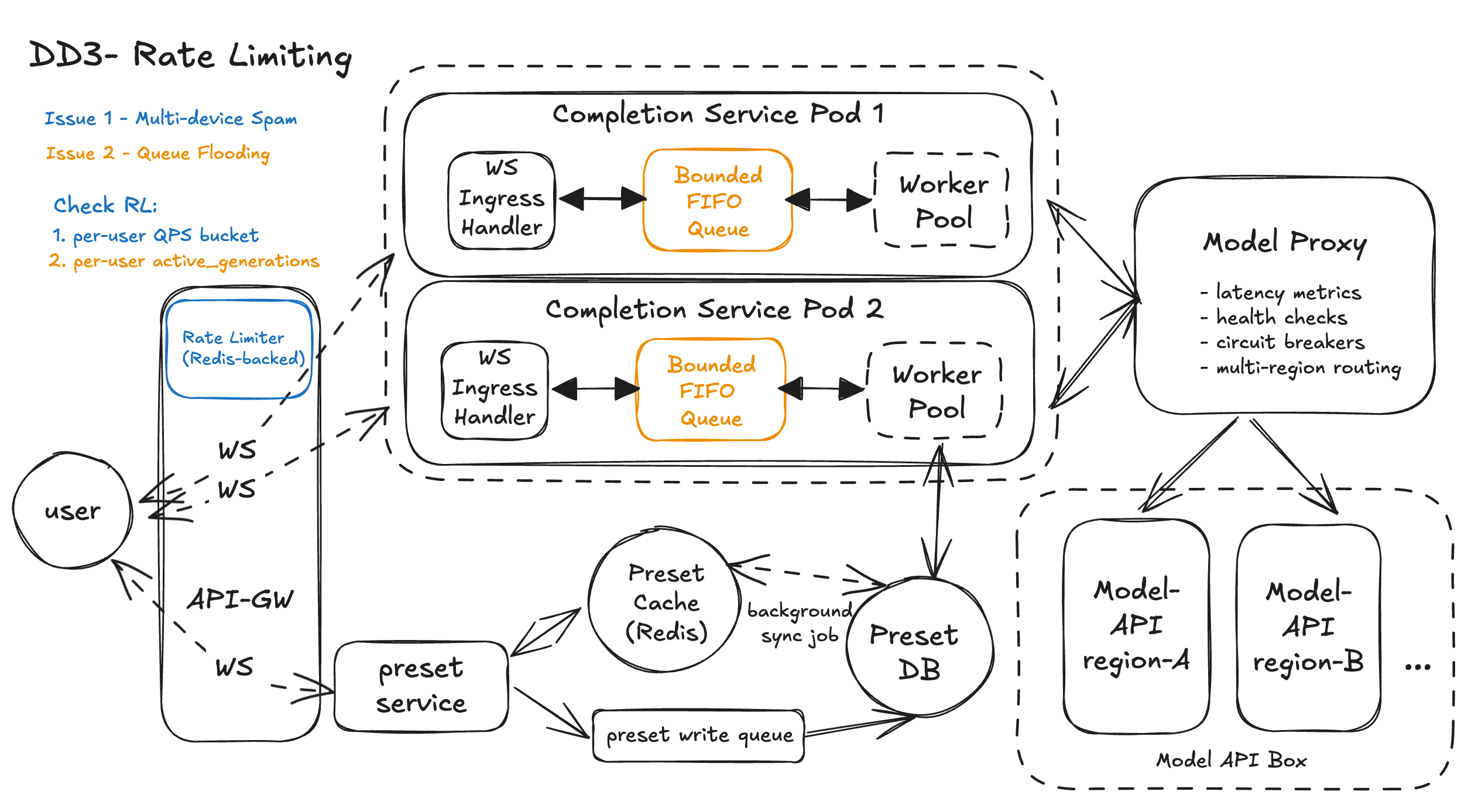
DD3 - Rate Limiting - Eg, How do we prevent spams from one user choking the system?
Issue 1 – Per-User Burst Control (QPS): How do we cap a single user across tabs/devices?
Solution: Option 3 – Centralized Distributed Rate Limiter
We add a Rate Limit Service as a small, dedicated component that API-GW calls before admitting a new completion.
1. Shared counters across gateways
When the user hits Submit, the WebSocket message that starts a new completion is treated as one logical request. API-GW calls the Rate Limit Service with (user_id, org_id, IP, "completions"). The limiter uses Redis to track sliding-window or token-bucket counters and decides if the user is still under the configured limit (for example, ≤ 60/min).
2. Consistent behavior across tabs and devices
Because the counters are keyed on user_id (and optionally IP/org_id) in a shared store, it doesn’t matter whether the requests come from three tabs, two devices, or a script. All of them consume the same bucket, so abuse is contained.
3. User-friendly errors, not silent failuresIf the limiter denies a request, API-GW immediately sends a structured WebSocket message like:The frontend can show a clear message and avoid spamming retries. Normal users rarely see this; heavy users get a clear explanation instead of mysterious hangs.
4. Building blocks involved
- API-GW: enforcement point; every new completion request checks the limiter.
- Rate Limit Service: small stateless API implementing token buckets, backed by Redis.
- Redis: stores per-user / per-IP counters.
- Completions Service / Model Proxy: unchanged; they only see traffic that already passed the limiter.
Issue 2 – Concurrent Generations: How do we stop one user from hogging the worker pool?
Solution: Option 3 – Per-User Concurrency Tokens
We add lightweight concurrency tracking in the same Rate Limit Service, coordinated with Completions.
1. Admission check at API-GWWhen a “start completion” message arrives, API-GW makes two checks against the Rate Limit Service:If the user already has 2 active generations, the concurrency check fails and API-GW sends back an error like code: "concurrent_generations_limit_exceeded".
- QPS bucket (Issue 1: “am I under my per-minute limit?”)
- Concurrency bucket (“how many active generations do I already have?”)
If the user already has 2 active generations, the concurrency check fails and API-GW sends back an error like code: "concurrent_generations_limit_exceeded".
2. Increment on start, decrement on finish
Once a request passes both checks and is put onto the bounded FIFO queue, the Rate Limit Service increments the user’s “in-flight” counter. When the generation finishes or the user hits Stop, the Completions Service (or API-GW) sends a tiny “release” call to decrement the counter.
- If the WebSocket drops unexpectedly, we rely on a short TTL on the concurrency entry (for example, 60–90 seconds) so stuck slots auto-clear.
- Optionally, a watchdog in Completions can detect timeouts and explicitly release tokens.
3. Fair sharing of the worker pool
Because each user can hold at most 2 tokens, they can never fully monopolize the worker pool. The bounded FIFO queue still orders all jobs, but the per-user cap ensures bursts from one user are naturally limited and other users’ jobs continue to make progress.
4. Building blocks involved
- API-GW: checks both QPS and concurrency counters before enqueuing.
- Rate Limit Service + Redis: maintain “active generations per user” with TTL.
- Completions Service: pushes accepted requests into the FIFO queue and signals completion to release concurrency slots.
- Worker Pool: unchanged; it pulls jobs from the queue and runs them, now protected from single-user hogging.
Workflow – Prevents One User from Choking the System
1. User starts a generation over WebSocket
The browser sends a “start completion” message to the WS Gateway over an existing WebSocket connection.
2. Global per-user QPS check at the edge
Before forwarding the request, the WS Gateway calls the Rate Limit Service (Redis-backed) with (user_id, org_id, IP).
- If the user exceeds their requests-per-minute budget, the gateway immediately responds with a clear
rate_limit_exceedederror over WebSocket. - If under limit, the request continues.
3. Per-user concurrency check (active_generations)
The Rate Limit Service also tracks how many active generations a user has.
- If the user is already at the max (for example, 2 concurrent generations), the gateway returns
concurrent_generations_limit_exceeded. - Otherwise, it increments
active_generations[user_id]and allows the request.
4. Accepted requests enter the bounded queue
For allowed requests, the WS Gateway forwards the message to a Completions pod.
- The WS Ingress Handler enqueues it into the pod’s bounded FIFO queue.
- If the queue is full, the pod responds “busy, please retry” and no more load is added.
5. Worker pool runs the job and streams tokens
A worker pulls the job from the queue, hydrates any preset, calls the Model Proxy, and streams tokens back over WebSocket (flush-every-token) to the user.
6. Concurrency token is released on finish/stopWhen the generation completes, errors out, or the user hits Stop, the Completions pod (or gateway) sends a small “release” call to the Rate Limit Service.
active_generations[user_id]is decremented.- The user can now start another completion without violating the concurrency cap.
Together, the QPS bucket and active_generations tokens make sure one user cannot flood the system, even with many tabs or devices, while normal users almost never hit a limit.
Design Diagram
DD4 - High Scalability - How do we prevent sudden traffic spikes from overwhelming stream infra?
Issue 1 – WebSocket Connection Fan-In at the Edge
Solution: Option 2 – Dedicated, Horizontally Scaled WebSocket Tier
We conceptually split the edge into:
- A WebSocket Gateway tier (the API-GW WS side) that:
- Terminates WS connections
- Enforces per-user rate limits (from DD3)
- Forwards messages to Completions pods over internal WS/gRPC
- A separate HTTP tier for REST-ish traffic (preset CRUD, health, etc.)
Autoscaling rules for the WS tier are tuned on:
- Active connection count per pod
- Messages per second
- CPU / memory thresholds
When traffic spikes, new WS connections are spread over more gateway pods. Existing pods aren’t overloaded with connection bookkeeping, so they can keep forwarding messages to Completions with low overhead.
Issue 2 – Completions Service Hotspots & Saturation
Solution: Option 3 – Multi-signal Autoscaling + Concurrency Caps
In this design:
- Each Completions pod exposes metrics:
queue_lengthfor its bounded FIFOactive_generations(currently running model calls)- CPU usage
- A cluster autoscaler / HPA uses these metrics:
- If avg queue length per pod stays high for N seconds → scale out more pods
- If queue length is near 0 and CPU is low → scale in safely
- The WS Gateway is aware of per-pod load:
- It routes new requests to pods with lower queue depth
- If all pods report “queue full”, it can return a fast “system busy, please retry” to the client instead of letting queues grow unbounded
Result: when a sudden spike hits, we don’t just overload a few unlucky pods. The system spreads load across the cluster, adds capacity proactively, and protects queues with hard limits.
Issue 3 – Preset Search at Scale (Elasticsearch / Search Index)
Preset search isn’t on the streaming hot path, but at large scale it can easily become a DB bottleneck under heavy use, especially when users lean on presets during a spike.
Solution: Option 3 – Search Index for Presets (Elasticsearch)
We enhance the Preset Service by adding an Elasticsearch-based search tier on top of the existing Preset DB and cache.
Write path fan-out
When a preset is saved or updated:
- It is first written to the Preset DB as the source of truth.
- In parallel, we emit a small message (or consume a CDC stream) into a Search Indexer job.
- The Search Indexer upserts a document in Elasticsearch, indexed by
user_id,preset_id,name, tags, and any other filterable fields (e.g.created_at,is_favorite).
Read path via Elasticsearch
For GET /v1/presets?query=...:
- The Preset Service issues a search query to Elasticsearch scoped by
user_idand text query (full-text on name/tags). - Elasticsearch returns a ranked list of matching
preset_ids plus light metadata (name, snippet). - If the client needs full preset details, the Preset Service then hydrates those IDs from the Preset Cache (Redis) or directly from the Preset DB.
Scalable search tier
The Elasticsearch cluster scales independently based on:
- Query QPS (more search nodes behind a coordinator when search traffic grows)
- Index size (sharding by
user_idor time, adding shards/replicas as data grows) - CPU / memory on search nodes (tuned for inverted index and text scoring)
Workflow – Handles Traffic Spikes
1. WS connections spike at the edge
A surge of users open the Playground. Browsers establish WebSocket connections to the WS Gateway Pool, which auto-scales based on active connections and messages per second so no single gateway node melts down.
2. Per-user limits filter abuse early
When a user hits Submit, the WS gateway calls the Rate Limit Service (Redis-backed) to check per-user QPS and concurrent generations. Abusive users get fast, explicit errors; only allowed requests are forwarded to Completions.
3. Requests are steered to less-loaded pods
The WS gateway routes each allowed request to a Completions pod with low queue depth and healthy metrics, spreading load so no single pod becomes a hotspot.
4. Bounded queues protect pods from overload
Inside each Completions pod, the WS Ingress Handler pushes requests into a bounded FIFO queue. A worker pool pulls from the queue up to a safe concurrency limit; if the queue is full, the pod signals “busy” and the gateway returns a friendly “retry later” instead of silently stalling.
5. Autoscaling adds more Completions capacity
Cluster autoscaling uses pod metrics (queue length, active generations, CPU) to spin up more Completions pods during the spike and scale back down when traffic drops, keeping latency and error rates under control.
6. Model + presets scale independently
Workers call the Model Proxy (which already does multi-region routing from DD1/DD2) and, when needed, the Preset Service. Preset search uses Elasticsearch, so heavy preset queries don’t compete with core completions for DB capacity during spikes.
Design Diagram

Final Thoughts
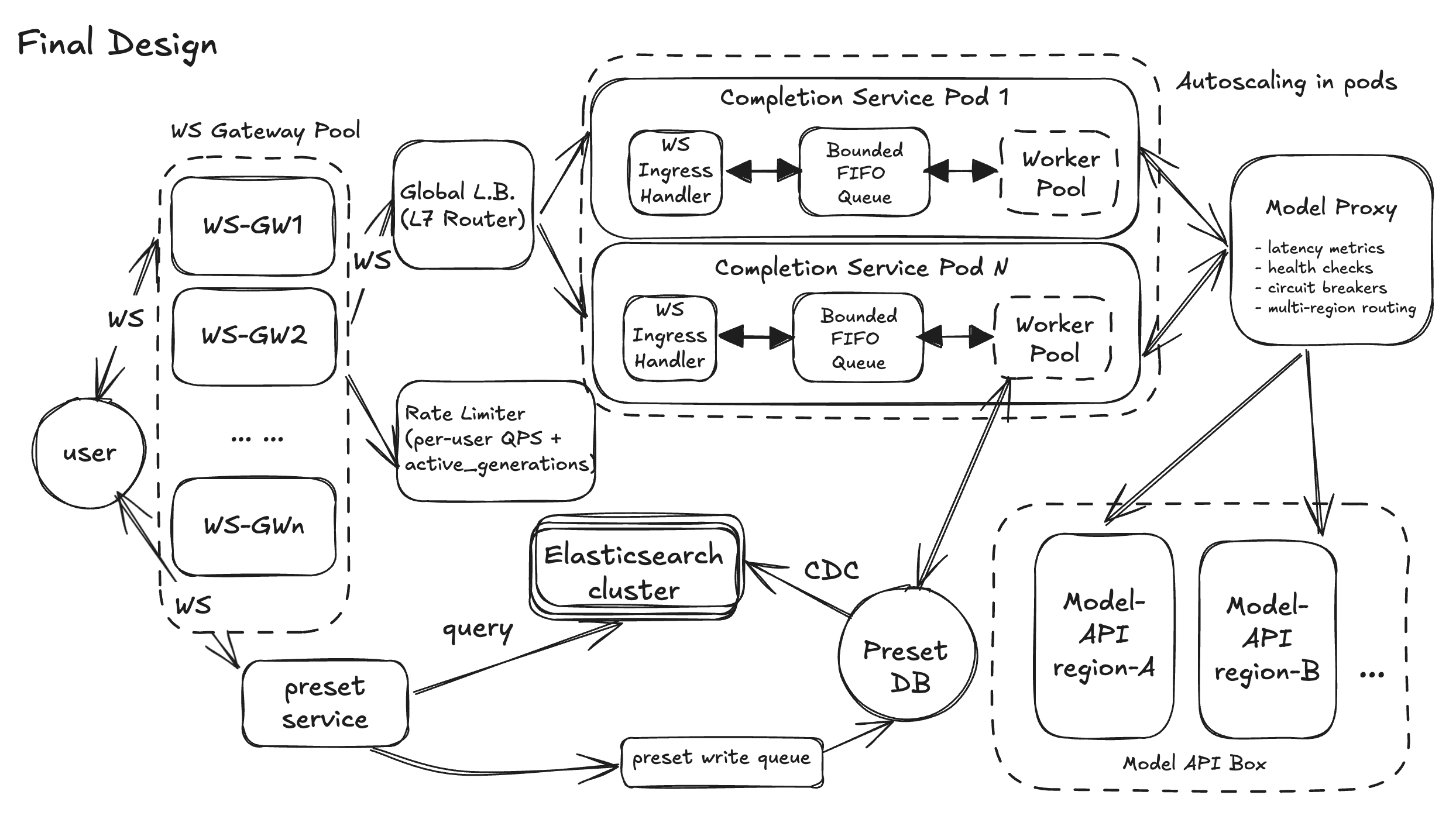
Stepping back, this Playground design does what we set out to do: start from four small, concrete user flows and grow them into a production-shaped system. FR1–FR4 give us a clean backbone: a WebSocket-based completions path, parameter control, presets as a first-class reusable asset, and a search → load → run loop that matches how people actually use ChatGPT. The HLD keeps the components small and well-named — API-GW, Completions Service, Preset Service, Model Proxy, WS gateways — so in an interview you can “walk the graph” without getting lost.
The deep dives then layer in the hard stuff without blowing up the core design. DD1 focuses on end-to-end latency with three levers: a Model Proxy to dodge cold/slow replicas, a bounded FIFO + worker pool to tame our own queues, and a WS streamer that flushes every token for that “typing” feel. DD2 makes the same components resilient: circuit breakers and multi-region routing in the Model Proxy, cache + degraded writes for presets, and stateless, health-checked Completions pods so individual failures don’t look like global outages. DD3 fences off bad actors with Redis-backed, per-user limits and queue-level protection, while DD4 zooms out to system-wide scale — WebSocket gateway pool, global L7 routing, autoscaling Completions pods, and Elasticsearch to keep preset search fast as data grows.
If you had more time, obvious “v2” directions would be richer safety and moderation hooks, multi-tenant org features, and deeper observability (per-tenant SLOs, cost dashboards, replay tooling). But for interview purposes, this doc already tells a complete story: you can deliver the basic product, you know exactly where it breaks under real-world scale and abuse, and you have concrete, technically credible plans to fix those weaknesses without over-engineering from day one.
But in the end, thanks for reading our article. We have dedicated coaches on these system design interview questions, we are here to help uplevel your tech interview performances.
Good luck with the final design diagram: