The calendar system enables users to manage events, send invitations, view schedules, and check availability with strong consistency, real-time multi-device sync, high scalability, and low-latency responses optimized for read-heavy workloads.
Google Calendar
Coach with Author
Book a 90-minute 1:1 coaching session with the author of this post and video — get tailored feedback, real-world insights, and system design strategy tips.
Let’s sharpen your skills and have some fun doing it!
Users can create events on their calendars with basic details (title, time, all-day flag, description, location), update those details later, and delete events they own. Only the event organizer (or calendar owner) can modify or delete an event.
FR2 – Invitations and RSVP
Users can add guests to an event and the system records each guest’s response as Yes/No/Maybe. Guests can update their own response, and the organizer can always see the current RSVP status for all invitees.
FR3 – Calendar Viewing (Weekly by Default)
Users can view their schedule in a calendar UI, with the weekly view as the default. The weekly view shows all events for that week and allows users to navigate to other weeks, open event details, and start creating new events from empty time slots.
FR4 – Free/Busy and Availability Checking
Users can check other users’ availability over a given time window, seeing when they are free or busy without necessarily seeing event details. This free/busy view helps organizers choose suitable time slots for meetings while respecting each user’s visibility settings
Non-Functional Requirements
NFR1 – Strong Consistency (CAP: Consistency over Availability)
The calendar backend is a single source of truth: once an event or RSVP is saved, all clients should see the same canonical state. Under network partition or quorum loss, we prefer failing writes rather than accepting conflicting versions of the same event.
CAP stance: For core event data, we choose Consistency over Availability; if we can’t safely commit, the write fails.
Guarantee:Read-your-own-writes is guaranteed for core APIs within a region.
💡 Why Consistency over Availability in this design? (Click to expand)
Impact of errors is worse than impact of failures: if an event silently “forks” (two times/guest lists both accepted), you get double-bookings and missed meetings. That feels like data corruption and destroys trust in the calendar. A transient “failed to save, please retry” is annoying but recoverable.
Partitions are rare, events are core: DB/quorum partitions are exceptional; event correctness is exercised constantly. Optimizing for the rare case (AP) at the cost of everyday correctness (C) is the wrong trade here.
Our other features depend on a single truth: free/busy computation, time suggestions, and multi-device sync all assume one canonical version of each event. If we allowed divergent writes, we'd need complex reconciliation logic that leaks into RSVP state, availability results, and device views.
Offline is handled at the edge, not by weakening server guarantees: when a user is offline, we queue changes locally and reconcile on reconnect with version checks. We do not relax the server’s consistency just because clients may be disconnected; this keeps the core store clean and predictable.
NFR2 – Multi-Device Real-Time Sync
The same account can be signed in on multiple devices, and changes must stay aligned across them with predictable, near-real-time behavior.
Cross-device propagation: Changes made on one online device appear on other online devices within 3–5 seconds (p95).
Offline edits: Edits made offline are queued and reconciled on reconnect, with explicit conflict surfacing if a newer version exists.
NFR3 – High Scalability
The system must sustain large user bases and long event histories while maintaining performance as read-heavy traffic grows.
Scale assumption: Up to tens of millions of users, each with hundreds of recurring series and thousands of events per year.
Traffic profile: Optimized for reads ≫ writes, with strong spikes during business hours and meeting-heavy periods.
NFR4 – Low Latency
Common user interactions should feel instant, especially viewing schedules and checking availability.
Views: Day/Week/Month view responses should be < 200 ms (p95).
Availability: Free/busy queries for up to ~10 users over a 1–2 week window should be < 500 ms (p95).
APIs & Entities
💡Note on Structure – Why APIs & Entities Are Separate This Time
In most ShowOffer delivery frameworks, we walk each FR vertically (FR → APIs → Entities → Workflow → Diagram). For this calendar system, I’ve intentionally pulled APIs and Entities into shared sections instead of repeating them inside each FR.
There are two main reasons:
Heavy cross-FR reuse of the same entities and APIs
In this problem, almost all FRs depend on the same core objects:
Event,
EventException,
Invitation,
FreeBusyBlock, and
ChangeLog.
The same APIs (e.g.,
GET /v1/events,
GET /v1/events?start_ts=…,
POST /v1/freebusy)
are used by multiple FRs: FR1 for CRUD, FR3 for views, FR4 for free/busy. If we followed the standard per-FR layout, we’d either duplicate these definitions four times or constantly say “same as FR1,” which adds noise but no insight.
Entities evolve as later FRs are introduced
The data model for a calendar is central and grows over time: FR1 defines
Event
and
EventException,
FR2 adds
Invitation,
FR4 adds
FreeBusyBlock,
and all of them write to
ChangeLog.
If entity tables lived inside each FR section, every refinement (e.g., adding
rsvp_status
or changing
recurrence_rule)
would require editing multiple places, increasing the risk of inconsistent diagrams and descriptions. A single Core Data Model section keeps entities canonical and lets FR sections focus on how they use those entities, not re-explain what they are.
Practically, this structure is still interview-friendly: verbally, I can walk each FR vertically (APIs → key entities → workflow), but in the written version I centralize APIs and Entities to avoid duplication and make it easier for the interviewer to see the big picture of the system at a glance.
APIs
Each FR maps to one or more API endpoints. Here we just define signatures, not full payloads.
FR1 – Event Management (Create / Modify / Delete)
Create event Creates a new event on the authenticated user’s calendar. If recurrence_rule is omitted or null, this creates a one-time event; if recurrence_rule is provided (RRULE-style), this creates a recurring event series. For all the recurred cases, we will discuss more in Deep Dive 1 after the High Level Design.
POST /v1/events
Get event Returns full details of a single event.
GET /v1/events/{event_id}
Update event Updates event fields; scope controls how recurring events are affected.
Add or update invitees for an event (organizer) Adds new guests or updates the guest list for an event.
POST /v1/events/{event_id}/invitations
List invitees and RSVP status (organizer) Returns all guests and their current RSVP status.
GET /v1/events/{event_id}/invitations
Update RSVP for an event (guest) Authenticated user sets or updates their RSVP (Yes/No/Maybe) for the event.
PATCH /v1/events/{event_id}/rsvp
FR3 – Calendar Viewing (Weekly by Default)
List events in a time range (used for day/week/month views) Returns all events on the authenticated user’s calendar within the given time window; the client uses this for weekly (default) and other views.
GET /v1/events?start_ts={start}&end_ts={end}
Get single event (Same as FR1) Used when user clicks an event in the calendar view to see details.
GET /v1/events/{event_id}
FR4 – Free/Busy and Availability Checking
Free/busy for multiple users Given a list of user IDs and a time window, returns each user’s busy intervals (no event details). This is used to power free/busy views in the UI and to manually choose suitable time slots for meetings.
POST /v1/availability
💡Why POST not GET in checking availability?
Semantically it’s a read, so we could expose
GET /v1/availability
with query params, but in practice we’d use
POST
because the request shape (multiple users, time windows, optional constraints) fits a JSON body much better and avoids URL length / encoding headaches.
Entities
User
Represents an account in the system; the owner of exactly one calendar. All APIs infer the acting user from auth.
Name
Comment
user_id
Primary key; unique identifier for the user.
email
User’s login / contact email.
name
Display name.
default_timezone
Default timezone for events and views.
Calendar
Represents the user’s single personal calendar (1:1 with User). All /v1/events APIs operate on this calendar for the authenticated user.
Name
Comment
user_id
Primary key; unique identifier for the user.
email
User’s login / contact email.
name
Display name.
default_timezone
Default timezone for events and views.
Event
Backs all event CRUD APIs and calendar views (POST/GET/PATCH/DELETE /v1/events, GET /v1/events?start_ts&end_ts). A row can represent a single event or a recurring series; recurrence semantics and per-occurrence overrides are detailed in Deep Dive 1.
Name
Comment
user_id
Primary key; unique identifier for the user.
email
User’s login / contact email.
name
Display name.
default_timezone
Default timezone for events and views.
Note: For recurring events, this Event row acts as the series definition. Per-occurrence overrides (e.g., “this instance only moved/cancelled”) are modeled via additional tables introduced in Deep Dive 1 (e.g., EventException).
Invitation
Represents each invitee (including guests) for an event, with their RSVP state; this is how FR2 APIs attach invitees to events.
Name
Comment
invitation_id
Primary key; identifier for this invitation record.
event_id
FK → Event.event_id; event the guest is invited to.
guest_user_id
FK → User.user_id; invited user (nullable if external only).
guest_email
Email of invited guest (used for external/lookup).
rsvp_status
YES, NO, MAYBE, or PENDING.
response_ts
Timestamp of the last RSVP update.
is_organizer
Boolean; true if this row represents the organizer as an attendee.
So: organizer is on the Event; all invitees (including organizer, if we want) live in Invitation. That keeps invitee data normalized and lets FR2 evolve without bloating the Event row.
FreeBusyBlock (Optional)
In the simplest design, FR4 POST /v1/availability can compute free/busy directly from Event + Invitation by expanding relevant events in the requested window. At scale, we introduce a derived FreeBusyBlock store to precompute busy intervals per user and keep availability queries fast.
Name
Comment
user_id
FK → User.user_id; user this busy block belongs to.
start_ts
Start of busy interval in UTC.
end_ts
End of busy interval in UTC.
status
Busy type (e.g., BUSY, OOO, TENTATIVE).
source
Optional reference (e.g., event_id or type) for debugging.
High-Level Design
This section explains how the APIs and entities work together in a running system. All four FRs share the same core architecture; each subsection then highlights the extra logic needed for that specific capability.
Architecture Overview
At a high level, the calendar looks like a single backend service fronted by an API gateway and backed by a relational event store:
Clients (Web / Mobile)
Render the calendar UI (event forms, views, availability).
Call the APIs defined earlier (/v1/events, /invitations, /rsvp, /availability).
API Gateway
Terminates TLS and validates authentication.
Extracts user_id from the token and forwards it to the backend.
Routes all calendar traffic to Calendar Service.
Calendar Service (single logical backend)
Implements all FRs:
Event module – FR1 (create/get/modify/delete).
Invitation module – FR2 (guest list + RSVP).
View module – FR3 (day/week/month views).
Availability module – FR4 (free/busy for multiple users).
Applies business rules (ownership checks, scope for recurring events, RSVP rules).
Uses version for optimistic concurrency to enforce strong consistency.
DB Store (Relational)
Strongly consistent store for the entities defined earlier: User, Calendar, Event, Invitation.
All FRs are expressed as reads/writes over this shared schema.
The diagrams for FR1–FR4 all follow this pattern:
clients → API-GW → calendar service → DB (User / Calendar / Event / Invitation)
Only the logic inside Calendar Service changes per FR.
FR1 is the foundation: it defines how events are created, read, updated, and deleted on a user’s calendar. All later features (views, invites, availability) depend on this event model.
Calendar Service loads the event, checks organizer ownership.
Non-recurring or scope=series: marks status = CANCELLED and increments version.
Recurring with scope=single/this_and_future: cancels only the relevant occurrence(s) while preserving past history (DD1).
Again, version is checked to avoid lost updates.
Design Diagram
As for the HLD in FR1 needs to truncate each sub-flow, we applied multi-color to illustrate better to audience. In the rest of this design, we will not apply sub-flow level in order to make room for the complicated diagram.
FR2 – Invitations and RSVP
Building on FR1’s event model, FR2 adds invitees and their responses via the Invitation table. The same Calendar Service now also manages guest lists and RSVP state.
Calendar Service responsibilities (FR2):
For guest management APIs, ensure the caller is the event organizer.
For RSVP APIs, ensure the caller is an invited guest.
Keep Invitation rows in sync with events, enforcing strong consistency for RSVP status.
Core flows (see FR2 diagram):
Organizer adds/updates guests – POST /v1/events/{event_id}/invitations
Calendar Service loads Event by event_id, checks organizer_user_id == user_id.
For each guest in the payload, upserts an Invitation:
New guest → create row with rsvp_status = PENDING, response_ts = null.
Existing guest → update fields (e.g., email) or mark removed if supported.
Response returns the updated guest list or a success status.
Organizer views guest list – GET /v1/events/{event_id}/invitations
Calendar Service verifies the caller is the organizer.
Reads all Invitation rows for that event_id, optionally joining with User to show names/emails.
Calendar Service finds the Invitation row for (event_id, guest_user_id = user_id).
If none exists, the request is rejected.
Otherwise, it sets rsvp_status = YES/NO/MAYBE and updates response_ts to “now”.
Because this is a single-row update in a consistent DB, organizers immediately see the new status.
Design Diagram
FR3 – Calendar Viewing (Weekly by Default)
FR3 uses the same canonical data (Event + Invitation) to render a time-bounded view (day/week/month). Weekly is the default, but the pattern is identical for other ranges.
Calendar Service responsibilities (FR3):
For a requested window [start_ts, end_ts], compute all events relevant to the user:
Events on their own calendar.
Events where they are invited and haven’t declined.
Expand recurring series into concrete occurrences in that window (DD1).
Merge and sort results so the client can draw them on a calendar grid.
Weekly view flow (see FR3 diagram):
Client requests window – GET /v1/events?start_ts={start}&end_ts={end}
User opens or navigates the calendar; client computes the window for that week and calls the API.
Calendar Service resolves context
Looks up the user’s calendar_id using owner_user_id = user_id.
Load owned + invited events
Owned: all Event rows on that calendar_id overlapping [start_ts, end_ts].
Invited: Invitation rows where guest_user_id = user_id, joined to Event rows and filtered to the same window; optionally excludes rsvp_status = NO.
Expand recurrence and apply overrides
For each event with recurrence_rule, expands it into concrete occurrences within the window and applies per-occurrence overrides (DD1).
Combines these with one-off events.
Merge, sort, and return
Produces a list of event instances (each with event_id, concrete start_ts/end_ts, title, etc.), ordered and grouped by day.
Client renders them into the week grid. Clicking an event uses FR1’s GET /v1/events/{event_id} to show details.
Design Diagram
FR4 – Free/Busy and Availability Checking
FR4 builds directly on FR3’s “what events exist in a window” logic, but changes the output: instead of full events, we return busy intervals per user across multiple calendars.
Calendar Service responsibilities (FR4):
Validate multi-user availability requests (window length, max number of users).
For each target user, compute when they are busy in the specified window, based on:
Events they organize.
Events they’re invited to and have not declined.
Reuse the same recurrence expansion logic as FR3, then compress to busy blocks.
Free/busy flow (see FR4 diagram):
Client requests availability – POST /v1/availability
Organizer selects target user_ids and a window (start_ts, end_ts) and calls the API.
Calendar Service validates request
Ensures start_ts < end_ts, window within bounds (e.g., ≤ 2 weeks), and number of users within limits (e.g., ≤ 10).
Resolve calendars and load events
For each target user_id, finds their calendar_id.
Loads:
Owned events on those calendars overlapping the window.
Invited events from Invitation where guest_user_id is in the target set, joined to Event, filtered to the window, ignoring rsvp_status = NO if desired.
Expand recurrence and compute busy blocks
For each event, expands recurring series inside [start_ts, end_ts] and applies overrides (Deep Dive 1).
For each user, collects all their event instances and converts them into [busy_start, busy_end] intervals.
Merges overlapping intervals to produce a compact list of busy blocks.
Return per-user busy intervals
Response maps each user_id to a list of busy intervals (no event details).
Client uses these blocks to visually show free slots and help the organizer pick a time.
Design Diagram
Deep Dives
DD1 - How do we deal with the recurred events?
From the high level design, we have already shed light to the core idea of this recurred events. And this is almost the top asked question during your interview as a follow-up deep dive. In this part, we will use a dedicated section to illustrate:
What options do we have to deal with recurred events and what is the best one?
What will be the corner cases in recurred events that we haven’t covered in HLD?
When a recurring event is created, immediately generate one row per occurrence for some horizon, e.g.:
On create: write all occurrences for the next 12 months into Event (or an EventInstance) table.
A background job periodically extends the horizon (e.g., always keep “next 6–12 months” materialized).
“This instance only” edits just update that one row.
Example:
If you create a weekly standup starting Jan 6, 2025:
You insert ~52 rows (one per week) covering Jan 2025–Jan 2026.
For FR3 & FR4 just query these instance rows by time range.
Pros
Very simple reads for FR3/FR4:
Views and availability are just “give me events in [start_ts, end_ts]”.
No recurrence expansion logic on the critical read path.
Simple per-occurrence edits:
“This instance only” = update that row.
“Cancel this instance” = mark that row cancelled.
Debuggable: What you see in DB is close to what users see in UI (one row per actual calendar cell).
Cons
Write amplification & storage blow-up:
Long-running series + many users = lots of rows.
Every “forever” series becomes N rows/year/user.
Painful pattern changes (“this and future”):
You may need to update or delete many instance rows (potentially thousands) to reflect series changes.
Increases lock time and risk of conflicts.
Horizon edge cases:
Beyond 1 year, the series “disappears” unless you pre-extend the horizon.
Background job failures → future meetings not visible.
In short, this option is great for very simple systems or short-lived recurrences, but doesn’t scale nicely for “forever” series and complex edits. Not a good fit for a Google Calendar–like product at tens of millions of users.
💡 Option 2 – Series Only, On-the-Fly Expansion (No Per-Instance State) (Click to expand)
During the creation, store only the series definition and expand on read:
Event entity has start_ts, timezone, recurrence_rule.
FR3/FR4 always compute occurrences on-the-fly inside the requested window.
There is no per-occurrence state as exception.
To keep this option coherent, we’d relax the product a bit:
Only support series-level edits (scope=series).
“This instance only” and “this and future” are not supported, or are internally treated as “change the whole series”.
Pros
Simplest data model:
Just one Event row for the series; no exceptions, no extra tables.
Writes are cheap:
Changing a series = update a single row.
Reads are predictable:
Expansion cost depends on the window size, not on how many exceptions exist.
Cons
Does not meet our product FR1:
We already committed to scope=single|this_and_future|series.
Users expect “just this instance” and “this and future” like Google Calendar.
No true historical preservation:
If you change the series, you change the interpretation of past occurrences as well.
That breaks “don’t mutate history” and makes auditing messy.
User-surprising behavior:
“I just wanted to move next week’s standup, but all past ones now look like they were at that new time.”
Overall, this is a nice “teaching” design for a simpler product, but it cannot satisfy our FR1 requirements (single-instance edits, this-and-future semantics, preserving history). We discard it given our spec.
💡 Option 3 – Series + EventException Table (Chosen Design)
The core idea is that we need to introduce an exception entity to deal with changes based on the defined event series initially:
Event row = series definition (base start time + recurrence_rule).
EventException rows = overrides or cancellations for specific occurrences, identified by event_id + original_start_ts.
On read (FR3/FR4):
Expand series occurrences within the window.
For each occurrence, look up a matching exception:
status = CANCELLED → drop it.
Otherwise, override fields (start_ts, end_ts, title, etc.) from the exception.
On write (FR1):
scope=series → update the Event row.
scope=single → insert/update a single EventException.
scope=this_and_future → typically split series into old + new, plus a few exceptions if needed.
Pros
Supports full product semantics:
“This instance only”, “this and future”, “series”.
Can move/cancel a single occurrence without rewriting everything.
Preserves history:
Past occurrences remain interpretable using the original rule + exceptions.
Middle edits don’t rewrite past rows.
Storage-efficient:
One row per series + one row per overridden occurrence; unchanged instances don’t consume more space.
Good for reads with bounded windows:
Expansion is limited to the requested [start_ts, end_ts].
Exceptions are typically sparse, so per-window cost is reasonable.
Aligns with Consistency:
Small, well-scoped writes (one series row + one exception row).
Easy to keep strong consistency with version on series and transactional updates including exceptions.
Cons
More complex logic than previous 2 Options:
You need a recurrence engine and an “apply exceptions” step.
FR1 edits must carefully write both Event and EventException in one transaction.
Slightly heavier reads than Option 1:
Need to: expand series → join with exceptions → apply overrides.
Needs thoughtful indexing and careful window limits to meet latency SLOs.
Edge cases (e.g. “this and future” splits) require careful design:
You’ll need clear rules on when to split series vs when to add exceptions.
Overall, option 3 hits the best balance for a Google Calendar–like system:
Respects strong consistency + history preservation.
Scales better than fully materialized instances (Option 1).
More complex than Option 2, but the complexity is localized to:
Event + EventException data model, and
a clear “expand + override” algorithm.
This is the design we choose for the rest of DD1 and the overall system.
How should we implement this change?
To make Option 3 concrete, we introduce a dedicated EventException entity. This table is only needed for recurring series and lives in the deep-dive, not the core HLD entities:
Each Event row with a recurrence_rule defines a series (e.g., “every Monday at 9am”).
EventException represents “this specific occurrence is different”:
It happens at a different time, or
It has a different title/location, or
It is cancelled.
During expansion, we match each computed occurrence to an exception (if any) and either override or drop that occurrence. And here is the concrete look on EventException :
Name
Comment
exception_id
Primary key for the exception row.
event_id
FK → Event.event_id; the recurring series this exception belongs to.
original_start_ts
The expected start time (UTC) of the occurrence according to the series rule (before any override). This is how we identify which instance is being changed.
override_start_ts
New start time (UTC) for this occurrence, if we move it. Nullable if time is unchanged.
override_end_ts
New end time (UTC) for this occurrence, if we change the duration. Nullable if unchanged.
override_title
Per-occurrence title override. Nullable; when null, use the series title.
override_location
Per-occurrence location override. Nullable; when null, use the series location.
status
ACTIVE or CANCELLED. If CANCELLED, this occurrence is skipped entirely.
created_at
Timestamp when the exception was created (for audit/debug; not critical to logic).
Read-time behavior (FR3 / FR4):
Expand the recurring series into candidate occurrences within the requested window.
For each candidate (event_id, instance_start_ts):
Look up EventException rows where event_id matches and original_start_ts == instance_start_ts (within some tolerance).
If no exception → use the series fields as-is.
If exception:
If status = CANCELLED → drop this occurrence.
Otherwise → override any non-null override_* columns (time/title/location).
Write-time behavior (FR1):
scope=series → update the Event row (series definition).
scope=single → write or update oneEventException row keyed by (event_id, original_start_ts).
scope=this_and_future → usually split series:
Old Event truncated to end before the cut.
New Event starts at the cut with the new rule.
Optionally add a few exceptions for edge cases around the cut.
All of this happens in a single transaction to respect our strong consistency stance.
💡 Summary – What Challenges Does ‘Recurrence Rules + EventException’ Actually Solve?
We have discussed option 3 that can solve the following use cases
“This instance only” edits without breaking the whole series
Mid-series changes without altering history
One-off cancellations for individual instances
Handling no-expiry / long-running series without infinite rows
💡 Mini Example – Handling “This and Future” with Series Split
So far, EventException handles sparse, one-off changes (“this instance only”). For larger pattern changes (“this and future”), we combine series split + exceptions.
Let’s look at a scenario to walk through how it builds the solution:
Original series:
Title: “Team Sync”
Rule: every Monday 09:00–09:30, starting 2025‑01‑06, no end date.
Stored as one Event row: evt_123 with recurrence_rule="FREQ=WEEKLY;BYDAY=MO"
On 2025‑03‑10, the user chooses in UI: “Edit → This and future” → move to 10:00–10:30
First, what do we do on Write?
Step 1 - Find the cut occurrence
Compute the occurrence being edited:
Original instance start: 2025-03-10T09:00 in America/Los_Angeles → 2025-03-10T17:00:00Z.
This is the first occurrence that should follow the new pattern.
Step 2 - Truncate the original series (evt_123)
Update evt_123’s recurrence to stop before the cut:
Add an UNTIL or equivalent limit so the last occurrence is 2025‑03‑03.
All history up to (and including) 2025‑03‑03 stays governed by this row.
Step 3 - Create a new series starting at the cut (evt_456)
Copy over other fields (title, description, location, organizer, etc.).
If there are invitations (FR2), we also clone the guest list from evt_123 to evt_456.
Step 4 - No exceptions needed in this simple case
Because the change applies cleanly at a boundary (“this date and all future”), we don’t need EventException for this example.
For more complex changes (e.g., shifting days with overlapping patterns), we might still use a small number of exceptions around the split.
2. How reads behave after the split?
Past weeks (before 2025‑03‑10):
FR3/FR4 expansion sees only evt_123, whose recurrence now ends before the cut.
All those occurrences remain at 09:00–09:30.
From 2025‑03‑10 onward:
Expansion sees evt_456 starting on 2025‑03‑10 at 10:00–10:30 and weekly afterwards.
The calendar shows the new time from that date forward.
Design Diagram
In this deep dive, we introduce a Recurrence Engine that encapsulates all recurring-event logic:
Calendar Service → Recurrence Engine
For FR3 (views) and FR4 (availability), the Calendar Service calls the Recurrence Engine to:
Expand series into concrete instances for a given [ts_start, ts_end] window.
Apply EventException to override or cancel specific occurrences.
All recurring behavior is centralized here, so both views and free/busy stay consistent.
Recurrence Workers → DB + Recurrence Engine
Background recurrence workers periodically scan the DB (Event, EventException, Invite, Calendar) for changes.
They call the same Recurrence Engine to expand only the near-future horizon (e.g., next 24 hours) and:
Schedule reminders/notifications now,
(In DD3) optionally prewarm caches or derived free/busy data.
DB (Event / User / Invite / Calendar / EventException)
Event holds the series definition (start_ts, timezone, recurrence_rule, etc.).
EventException stores per-occurrence overrides/cancellations keyed by (event_id, original_start_ts).
Invite and Calendar are reused as in HLD; no new services, just one new table and one shared engine.
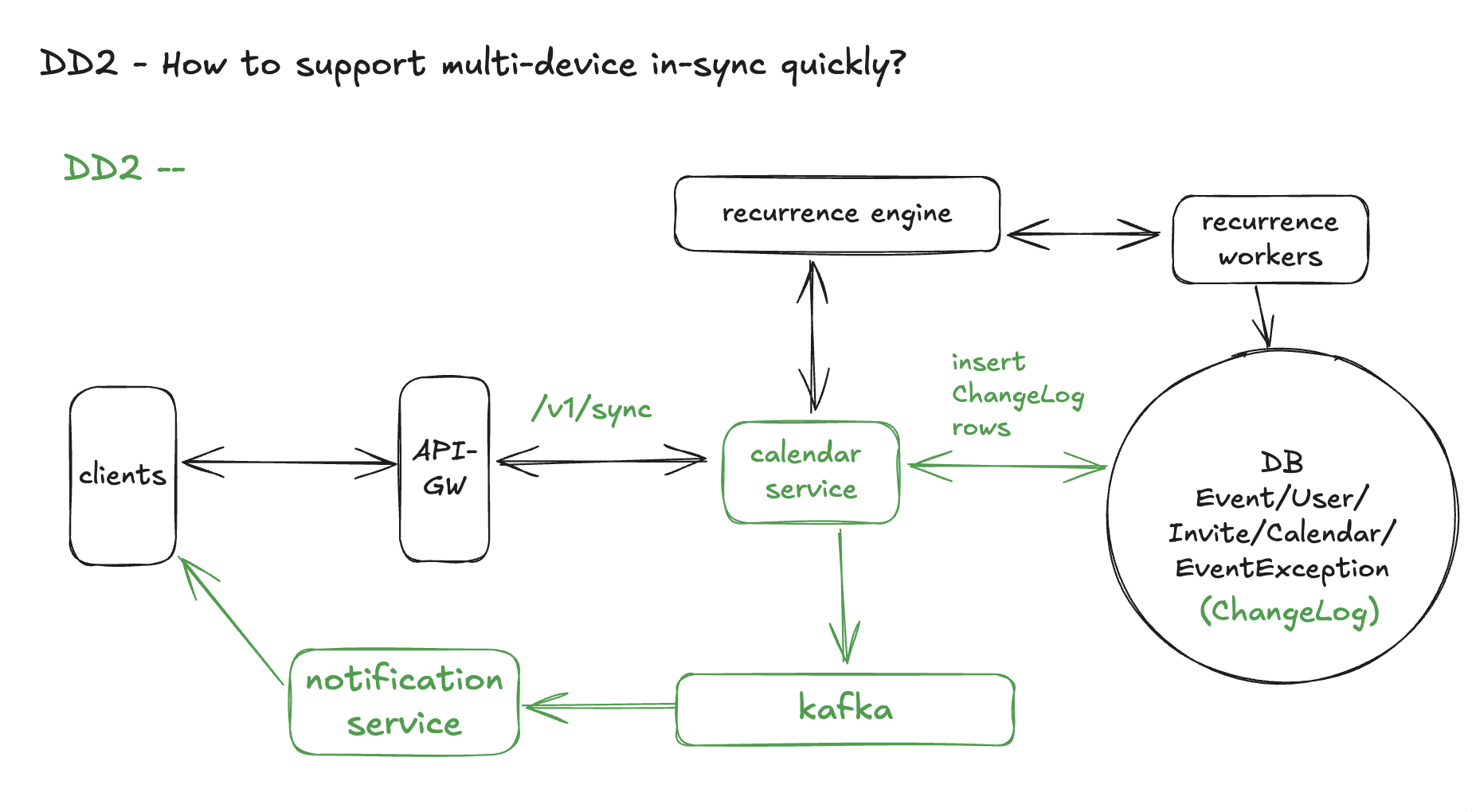
DD2 - How to support multi-device in-sync quickly?
💡 We want the same user, signed in on multiple devices, to see changes propagate in ≤ 3–5 seconds (p95) while still respecting our Consistency over Availability stance.
Key behaviors:
Device A edits an event → Device B & C should reflect it quickly without reloading the whole calendar.
Devices can go offline, make edits, then reconcile when back online.
The server remains the single source of truth; devices are just caches.
💡 Option 1 – Simple Periodic Polling
Each device periodically polls:
Either GET /v1/events?start_ts&end_ts for the visible window, or
A light /v1/sync endpoint with “changes since X”.
Polling interval might be 10–30 seconds.
Pros
Very simple to implement:
No extra infra beyond existing APIs.
No WebSockets / push infra.
Fully leverages strong server state:
Every poll gets canonical data from the DB.
Cons
Latency tied to the polling interval:
If we poll every 30 seconds, worst-case propagation is ~30s.
To reach 3–5s, we’d need very aggressive polling → lots of wasted traffic.
Expensive at scale:
Tens of millions of users × frequent polls = massive QPS, most of which return “no changes”.
Battery / bandwidth unfriendly on mobile.
Summary
Good as a baseline and fallback, but doesn’t hit our latency + efficiency goals cleanly.
We’ll keep a slow poll as a safety net, but not rely on it as the primary mechanism.
💡 Option 2 – Polling with Delta (/sync) + ChangeLog (No Push)
Improve Option 1 by adding a change log and a delta API:
Maintain a ChangeLog (or EventChange) table with a monotonically increasing sequence.
Expose a GET /v1/sync?cursor=...:
Input: last seen cursor.
Output: list of changes since that cursor (create/update/delete, event_ids) + new cursor.
Devices poll /sync periodically instead of refetching full views.
Pros
Much cheaper than refetching everything:
Devices only pull changes, not full windows.
Good offline story:
When a device comes back, it calls /sync with its last cursor and gets all missed changes.
Still uses strong server state as source of truth.
Cons
Still limited by polling interval:
If /sync is polled every 15–30s, multi-device lag is still too high.
Extra complexity on the backend:
Need to maintain ChangeLog and cursors.
Doesn’t exploit the fact that many devices are online and connected and could be notified immediately.
Summary
Better than pure polling and useful as a core primitive (we’ll reuse /sync), but not enough on its own to reach “near real-time” without aggressive polling.
Layer push invalidation on top to get <5s propagation for online devices.
Fall back to periodic polling /sync for robustness.
We’ll adopt Option 3.
How should we implement this change?
We first introduce another new entity that helps this deep dive, which is ChangeLog.
Like EventException in Deep Dive 1, ChangeLog is a deep-dive-only entity used for sync. It does not appear in the core HLD entities. Here is the schema that should have in a ChangeLog event:
Name
Comment
change_id
Monotonically increasing sequence (bigint); acts as the global cursor.
user_id
User affected by this change (organizer or invitee). We write one row per affected user.
event_id
Event whose state changed.
change_type
CREATED, UPDATED, DELETED, RSVP_UPDATED, etc.
changed_at
Timestamp of the change (for debugging, not primary cursor).
source
Optional: WEB, MOBILE, WORKER, etc. (useful for debugging).
Every time an event changes in a way that affects user X’s calendar, we append a row with an increasing change_id for user X. Devices use change_id as a cursor to request “all changes after N”.
Then, we need to add a delta sync endpoint (not in the main APIs table to keep it focused; introduced here in DD2):
GET /v1/sync?cursor={last_seen_change_id}
Example responses:
First sync (no cursor):
GET /v1/sync
Response:
{
"cursor": 12345,
"events": [ /* initial snapshot of relevant events for default windows */ ]
}
For each inserted row, publish a message to the message bus or directly to Notification Service:
{ "user_id": ..., "latest_change_id": ... }
Notification / Sync Service pushes invalidation
Receives the message and looks up active connections for that user_id (Laptop, Phone, Tablet).
Sends a small push: “Your calendar has changed; latest cursor ≥ 12360”.
Other devices call /sync
Phone and Tablet receive the push.
Each calls: GET /v1/sync?cursor=their_last_seen_cursor.
Calendar Service:
Reads ChangeLog rows for that user_id with change_id > cursor.
Returns a list of changes (and optionally the updated event docs).
Devices update their local view/cache.
Propagation time is dominated by:
Calendar write latency + ChangeLog insert,
Message bus + push latency,
One /sync call.
This keeps us well within the 3–5s p95 target.
Offline & Conflict Handling
Let’s take a look on the offline device behavior:
Each device stores its last cursor locally (e.g., in SQLite).
When offline:
It can still show the last synced view from local cache.
If the user edits events offline, the client:
Writes locally.
Queues outbound operations (e.g., “PATCH event X”) to be sent later.
When it comes back online:
It first calls /v1/sync?cursor=last_cursor to pull missed server-side updates.
Then replays its queued writes:
If writes are against stale versions, Calendar Service returns 409 Conflict.
Client can:
Reload server state,
Merge or re-ask user (e.g., “Meeting was changed elsewhere; do you still want to move it?”).
Because the server is canonical and every write is version-checked, we never have silent divergence: either the offline edit cleanly applies, or we surface a conflict.
Design Diagram
DD3 - How to quickly check availability & provide suggested event time for a group of users
💡 Deep Dive: Why We Might Need FreeBusyBlock (Click to Expand)
In this deep dive, we want to:
Quickly check a group of users’ availability/conflicts in < 500 ms p95 over a 1–2 week window for interactive “find a time” flows.
Find a suggested time from the system based on availability checks.
Recall from HLD that POST /v1/availability currently walks Event + Invitation, uses the Recurrence Engine from DD1, and computes busy intervals online.
In the entities section, we marked FreeBusyBlock as optional. In this deep dive we’ll explore whether we actually need such a derived store, and if so, how to keep it fresh while preserving our Consistency over Availability stance.
Run a periodic batch (e.g., nightly or hourly) that:
Expands events for each user for the next N days (say 30–60).
Materializes per-user busy intervals into a FreeBusyBlock table.
/v1/availability queries FreeBusyBlock instead of raw events.
Pros
Very fast reads:
Availability queries become simple range scans over pre-merged blocks.
Easy to compute suggestions:
Work on a small set of intervals instead of all events & recurrences.
Cons
Staleness:
Any event changes after the batch won’t show in free/busy until the next run.
Tradeoff is unpleasant:
Either accept noticeably stale answers (“this time looks free but was just booked”),
Or add real-time corrections on top, which complicates the system anyway.
Batch cost grows with user base; recomputing everything each run can be expensive.
Summary
Nice for a small or low-change system, but the staleness is too high for a Google-Calendar–like product that expects near real-time availability.
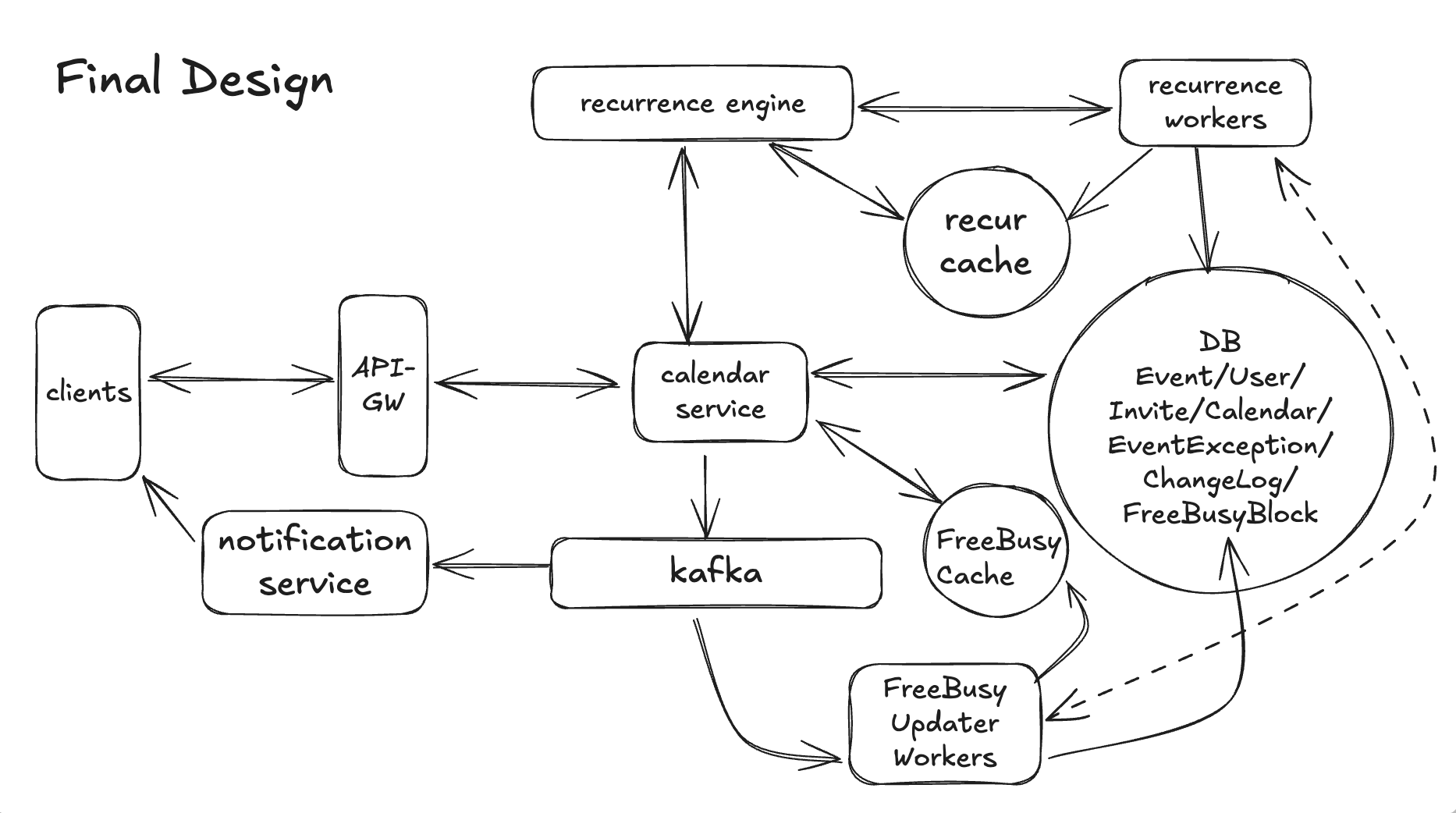
💡 Option 3 – Incremental FreeBusy Store + Cache (Chosen)
Use a derived “busy blocks” store per user that is:
Incrementally updated when events change, driven by the same ChangeLog/Kafka pipeline from DD2.
Backed by the Recurrence Engine from DD1 to recompute only the affected days.
Served via a cache (e.g., Redis) so /v1/availability reads are fast and predictable.
The canonical truth is still Event + EventException + Invitation;
FreeBusyBlock is a materialized view tuned for FR4.
We keep Option 1 as a fallback (misses, edge cases), but most requests hit the derived store.
Good, we now commit to using FreeBusyBlock at scale. So for a given (user_id, day), the FreeBusyBlock rows are the merged busy intervals for that user for that day, across owned and accepted events. It’s okay if FreeBusyBlock lags the canonical state by a few seconds; we’ll talk about how we cap that staleness next.
Design Diagram
Now let’s dig into what the write path and read path looks like in the design diagram.
1. Write Path: Keeping FreeBusyBlock Fresh Goal: when an event or RSVP changes, update derived busy blocks (and cache) for all affected users and days.
🛠️ Step-by-Step: FR1/FR2 Write Flow (Click to Expand)
Client → API-GW (FR1/FR2 write)
User creates/updates/deletes an event or RSVP.
Client calls one of the existing APIs:
POST   /v1/events
PATCH  /v1/events/{event_id}
DELETE /v1/events/{event_id}
PATCH  /v1/events/{event_id}/rsvp
API-GW → Calendar Service
API-GW authenticates the request, extracts user_id, and forwards it.
Calendar Service → Apply core business logic (canonical write)
Validates payload, permissions, and recurrence (from DD1).
Applies FR1/FR2 logic in a strong-consistency transaction to tables:
Event, EventException, Invitation, and optionally Calendar.
Calendar Service → Append ChangeLog rows (DD2)
After transaction commits, for each affected user (organizer + invitees):
Insert into ChangeLog:
{
  change_id,
  user_id,
  event_id,
  change_type,
  changed_at
}
Client renders colored free/busy strips and time suggestions.
Final Thoughts
Overall, this calendar design doc hangs together really well: it starts from clear, interview-ready FRs (events, invitations/RSVP, calendar views, free/busy) and a tight NFR stack that explicitly picks Consistency over Availability, then cleanly factors APIs and Entities as shared building blocks before walking through HLD for each FR.
The deep dives feel coherent rather than bolted on: DD1 introduces a realistic recurring-events model with Event + EventException and a recurrence engine; DD2 layers on multi-device sync via ChangeLog, Kafka, and /v1/sync; DD3 then reuses the same primitives (ChangeLog, recurrence engine) to build a scalable FreeBusyBlock + cache path for fast availability checks, with separate write/read diagrams that make the data-flow story easy to follow.
The result is a consistent narrative: one canonical event store, a small set of reusable services/components, and progressively richer derived views (exceptions, sync, free/busy) that satisfy both product needs and the NFRs without overcomplicating the core.
Unlock Full System Design Access
Get full access to deep dives on real interview walkthroughs, detailed trade-off analysis, and insights to help you reach your target level (Staff+).